Overview
Light Cloud is a modern deployment platform that connects directly to GitHub repositories and transforms every git push into a live URL. The service is designed for developers who want a streamlined path from code to production without juggling multiple infrastructure providers. It combines static site delivery via a global CDN, container execution on Cloud Run, and managed PostgreSQL databases within a single control plane. This integration sets it apart from single-purpose hosting services, as it addresses frontend, backend, and data storage needs in one workflow.
The platform also emphasizes environment previews for every branch and pull request, making collaboration and testing more efficient. Developers can share a unique URL for each feature branch, and those previews are automatically removed when the branch is deleted. Additionally, Light Cloud taps into the growing trend of AI-assisted development by offering an MCP server for Claude and a VS Code extension for GitHub Copilot. This allows deployment commands to be issued directly from chat interfaces, reducing context switching.
In a market dominated by established players like Vercel and Netlify, Light Cloud differentiates itself with its full-stack approach and AI-native features. The company also runs an experimental lab called ICE, an open-source visual cloud editor, which hints at a broader ambition to simplify infrastructure design. As a relatively young product, Light Cloud is actively evolving, but it already offers a compelling suite of tools for developers seeking a more integrated deployment experience.
Key Features
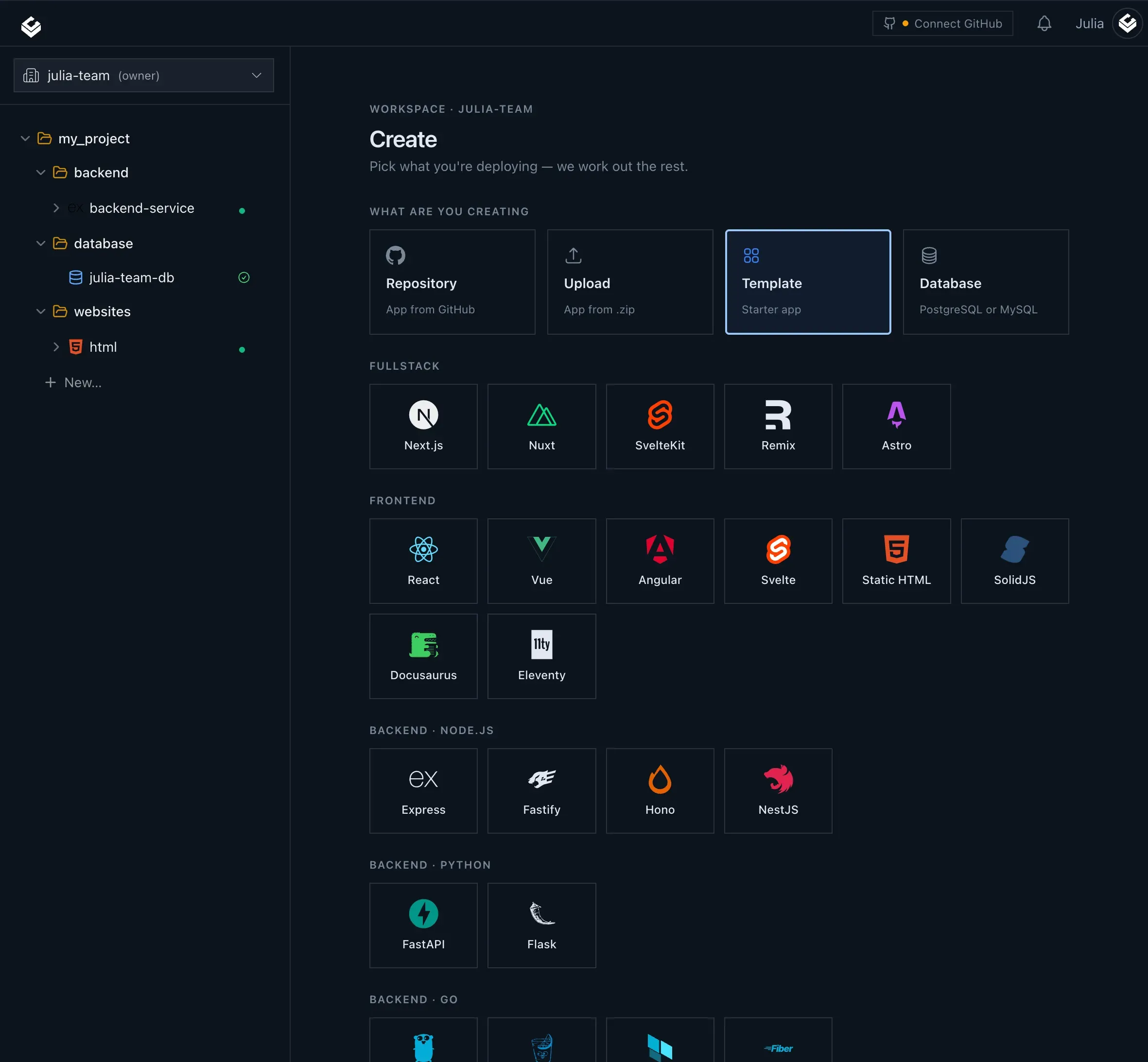
GitHub-Integrated Deployments The core workflow revolves around connecting a GitHub repository. Once linked, every push automatically triggers a build and deployment. Light Cloud reads the repository structure and determines whether the project is a static site or a containerized application, routing it to the appropriate runtime without requiring manual configuration. This automation reduces the friction often associated with setting up CI/CD pipelines.
Managed Postgres Light Cloud provides managed PostgreSQL databases that can be provisioned directly from the same project dashboard. Users select a tier, region, and storage size, and the platform handles the rest. Credentials are encrypted and automatically injected into the application's environment, ensuring secure connections without manual setup. This is a significant advantage for full-stack applications that need a reliable database layer.
Per-Branch Preview Environments Every branch and pull request receives a unique live URL. These previews are built on each push and automatically dismantled when the branch is merged or deleted. This feature is invaluable for teams that want to review changes in a production-like environment before merging, and it helps prevent unstable code from affecting the main site. The ephemeral nature of these URLs also keeps the deployment list clean.
Scale-to-Zero Containers Container workloads run on Google Cloud Run, which supports scaling to zero when there is no traffic. This means idle services stop incurring compute costs, and users pay only for the actual execution time. This is particularly beneficial for APIs, bots, or low-traffic services that would otherwise waste money on always-on instances. The cost savings are a major selling point for startups and side projects.
AI-Driven Deployment Tools
Light Cloud offers a dedicated MCP server that allows Claude, Anthropic's AI assistant, to create applications, deploy them, and read logs directly from a conversation. Additionally, a VS Code extension integrates with GitHub Copilot, adding slash commands like /deploy, /status, and /plan. These tools aim to make deployment accessible through natural language, reducing the need to switch to a browser dashboard. The feature is experimental but highlights the platform's forward-thinking approach.
Integrated Observability Logs and metrics are displayed alongside the environment they belong to, eliminating the need for separate monitoring services. Users can watch a build stream in real time and then follow the running service's logs and performance metrics. This built-in visibility simplifies debugging and operational oversight, making it easier to understand what is happening with each deployment.
Framework Detection and .env Parsing Light Cloud automatically detects popular frameworks and parses environment variable files, reducing manual configuration steps. This automation ensures that projects are deployed with sensible defaults, allowing developers to focus on writing code rather than wrestling with build settings. For more complex setups, users can still customize settings via the dashboard or configuration files.
How It Works
The typical user journey begins with creating an account on Light Cloud and connecting a GitHub repository. After authorization, Light Cloud scans the repository and identifies the project type. For static sites, it configures a CDN deployment; for containers, it sets up a Cloud Run service. The user then chooses the deployment settings, such as region and resource limits, and the initial deployment begins.
On every subsequent git push, Light Cloud automatically builds the new commit across all branches. For each branch, it creates a unique preview URL, allowing developers to inspect changes in isolation. If the branch is a pull request, the preview is linked to that PR, facilitating code reviews. Once the branch is merged or deleted, the preview is torn down automatically.
For containerized applications, Light Cloud can provision a managed Postgres database if the user requests one. The platform securely stores the database credentials and injects them as environment variables into the running container. This seamless integration means developers do not need to handle database setup separately.
To leverage AI deployment, users can install the VS Code extension or configure the MCP server with Claude. Then, from a chat window, they can issue commands like "/deploy" or ask Claude to create a new app. The platform performs the deployment and returns logs and URLs, all within the conversation context.
Use Cases
Solo Developers and Side Projects For individual developers, Light Cloud offers a free plan and scale-to-zero containers, making it cost-effective to host side projects. The GitHub integration eliminates the need for complex setup, allowing a project to go live within minutes of the first push. Per-branch previews also help when experimenting with new features without affecting the main site.
Full-Stack Teams Teams working on full-stack applications benefit from having the frontend, backend, and database in one place. Instead of coordinating between separate hosting providers, a single dashboard manages everything. The managed Postgres service reduces the operational burden, while integrated observability helps quickly identify issues across the entire stack.
Agencies and Freelancers Agencies often need to show clients incremental updates. With Light Cloud, each client project or feature branch can have its own preview URL, making it easy to share progress. The automatic cleanup of previews prevents clutter, and the custom domain support allows branded URLs for production deployments.
AI-Powered Development Workflows Developers who rely on AI coding assistants can delegate deployment tasks to Claude or GitHub Copilot. For example, a developer working in VS Code can type "/deploy" to push the current branch to a preview environment without leaving the editor. This streamlines repetitive operations and keeps the developer in a flow state.
Startups with Tight Budgets Startups often need to minimize cloud costs while scaling. Light Cloud's scale-to-zero model ensures that idle services do not incur charges, and the free tier helps with initial prototyping. As traffic grows, users can upgrade their plans or adjust resource limits, paying only for what they actually use.
Pricing & Value
Light Cloud offers a free plan that includes a limited number of deployments and resources, making it easy to test the platform. For production usage, pricing is based on container compute time, database tier, and additional features. Since containers scale to zero, users are not billed for idle services, which can lead to significant savings compared to always-on virtual machines. The managed Postgres pricing is competitive with other database providers, and the included observability features reduce the need for external monitoring tools.
While detailed pricing information is not fully listed on the homepage, users can check the pricing page for current tiers and limits. The free plan is generous enough for small projects, and the scale-to-zero approach makes the paid plans more cost-effective for low-traffic applications. Overall, Light Cloud offers a strong value proposition, especially for developers who want a simple, all-in-one platform without sacrificing performance.
Final Verdict
Light Cloud is a promising deployment platform that excels in simplifying the path from GitHub push to a live URL. Its full-stack approach, per-branch previews, and AI integration make it a distinctive choice in a crowded market. The platform is particularly well-suited for developers who value automation and want to avoid managing multiple cloud services. The built-in observability and managed Postgres add significant convenience, while the scale-to-zero containers help keep costs low.
However, the platform is relatively new and may not yet have the extensive integration ecosystem or advanced configuration options offered by more mature competitors. The AI deployment tools are still experimental and might require occasional manual fallback. Additionally, the core product is proprietary; only the companion ICE project is open source, which could be a concern for users seeking full transparency and self-hosting options.
Despite these areas for improvement, Light Cloud is a compelling option for developers and teams who want a streamlined deployment workflow with modern features. Those interested in visual infrastructure design might also want to explore the Labs section, where the open-source ICE project demonstrates the company's innovative direction. For a hassle-free experience from code to cloud, Light Cloud deserves serious consideration.