Overview
ScreenWhite is a web-based utility that transforms any display into a solid, full-screen color field, starting with a pure white background. Live at screenwhite.app, the platform addresses the everyday need for a neutral, evenly lit surface in photography, video production, remote work, and digital art. The core product is lightweight enough to load in under a second, with a page weight of roughly six kilobytes, yet it includes surprisingly deep controls: brightness adjustment between 10% and 100%, color temperature from 2000K to 9000K, a Screen Wake Lock toggle, and a timer for automatic exit. Users can also generate and download white images in PNG, JPG, or WebP formats, from a single pixel up to 7680×4320 (8K).
The service is completely free, requires no registration, and claims to store no user data. It belongs to a broader ecosystem of similar pages maintained under the ScreenWhite brand, which currently offers more than 24 named colors and a suite of additional tools like a dead pixel test, fake update screens, and a DVD screensaver. The site's complete color directory shows the range of available shades, while the main focus remains on ease of access: the white screen is the default landing page and renders the background color inline in the HTML before any JavaScript executes, eliminating the annoying white flash during load.
ScreenWhite's market positioning is distinct because it couples minimalism with precision. Instead of just presenting a blank white rectangle, the application offers fine-grained environmental controls normally found in professional display calibration tools. It also addresses a practical issue for video conferencing users by including the "keep awake" feature, which leverages the browser's Wake Lock API to prevent the OS from sleeping mid-call. This combination of utility and performance makes ScreenWhite a top candidate for anyone needing a reliable full-screen background, whether for lighting, tracing, testing, or simple placeholder generation.
Key Features
One-Click Fullscreen Mode
The primary action is setting the screen to fullscreen with a single click. The "Full screen" button and an F-key shortcut hide all page elements and expand the background color to cover every pixel of the display. Because the color is inline in the HTML, the transition is immediate, without the typical delay that occurs when a CSS file loads. Exiting fullscreen is just as easy: press Escape or click the appropriately labeled exit button. This simplicity is central to the tool's appeal.
Brightness and Color Temperature Sliders
Two sliding controls let users fine-tune the white output. Brightness ranges from 10% to 100%, allowing the screen to serve as a subtle fill light or a full-powered panel. Color temperature adjusting from 2000K to 9000K enables an easy switch between candle-warm and cool daylight. The backend logic recomputes the actual RGB value based on the selected Kelvin temperature, rather than overlaying a CSS filter, which ensures the screen's true color and prevents the controls themselves from being tinted. This is an engineering detail that professional users will appreciate.
Wake Lock and Timer
The "Keep awake" checkbox utilizes the Screen Wake Lock API to request a permission from the operating system that prevents the display from turning off. This is crucial for applications where the screen must remain active for extended periods, such as when using the white field as a video light source. The API is supported in current versions of Chrome, Edge, Safari, and mobile browsers; in unsupported environments, the control becomes disabled automatically. A timer dropdown can be used to set a duration of up to one hour, after which the app presumably exits fullscreen—handy for timed meditation or focus sessions.
Downloadable Images up to 8K
A separate panel allows users to export the white background as a static image. Formats include PNG, JPG, and WebP, and a grid of common resolutions is available: HD (1920×1080), 2K, 4K, 5K, 8K, mobile, square, and even a single pixel. PNG images are generated server-side by directly encoding a one-bit palette image with no external image processing library, which yields extremely small file sizes—an 8K PNG is only a few kilobytes. WebP and JPG are created client-side. The process is free and watermark-free, and there are direct download links for the most popular sizes without visiting the panel.
Embeddable iframe
ScreenWhite provides a small HTML snippet that allows anyone to embed the white screen on a website. The iframe can be sized as needed and only displays the colored background. This is useful for web developers who need a dynamic white canvas, or for bloggers who want a quick way to let readers view a full-on white screen without leaving the page. The embed version mirrors the full-screen functionality in a contained window.
Companion Pages and Related Tools
The entire ScreenWhite ecosystem extends far beyond a single white screen. The site includes dedicated pages for black, red, blue, green, yellow, orange, pink, purple, cyan, magenta, teal, and many other colors. Adjacent sections offer practical and entertainment-oriented utilities, such as the dead pixel test, a monitor uniformity checker, a broken screen effect, and a Matrix rain animation. All of these are accessible from the screen tools hub and help users test display quality or just have fun.
How It Works
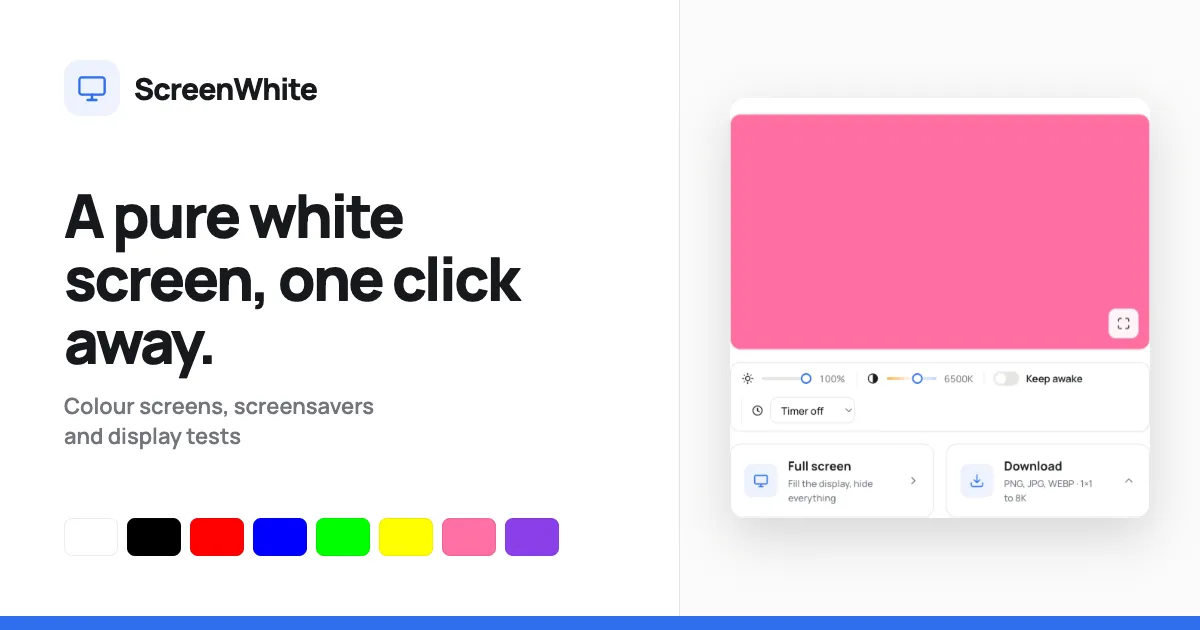
The user journey typically starts at the homepage, which immediately shows a preview of the white background alongside the control toolbar. The brightness and warmth sliders are at the top, followed by the "Keep awake" and timer options. Users can adjust the color and see the preview update in real time. When they click "Full screen," the browser enters fullscreen mode and the background takes over the entire monitor; all other web elements disappear, leaving only the screen. The exit process is reversed by pressing Escape or using the on-screen exit button.
If a static asset is required, the "Download" section expands to reveal format and size pickers. After selecting the desired options, a single "Download" button composes and saves the file. For especially small files, the direct links bypass the interface altogether; for example, a 1920×1080 white PNG is always hosted at /image/white-1920x1080.png. The website employs no database and stores no files permanently. It also works on mobile devices, with the caveat that iOS Safari does not permit true fullscreen, but the viewport can be filled, and users can add the page to their home screen to create a web app-like experience. The entire app is about six kilobytes, ensuring fast loads even on slow networks.
Use Cases
Video Call Enhancing: In these days of remote work, a laptop or secondary monitor can become a cheap fill light. By opening ScreenWhite on a laptop placed to the side, video call participants can soften shadows on their face and add a professional glow. The adjustable warmth ensures the light doesn't clash with tungsten or LED room lighting. Keep awake mode is particularly valuable during marathon meetings, preventing the screen from going dark and leaving the user in harsh lighting.
Art Tracing and Calligraphy: Artists who want to trace a sketch onto a new sheet can lay paper over a tablet or laptop displaying ScreenWhite. A bright white background makes outlines visible through normal printer paper, eliminating the need for an expensive lightbox. The brightness slider allows easy dimming so it doesn't hurt the eyes during long tracing sessions. Illustrators can also use the screen as a reference light for checking line weight and contrast.
Monitor Defect Detection: A white screen is the gold standard for spotting dead pixels, dust specks, or uneven backlighting. ScreenWhite provides this immediately, and the linked dead pixel test cycles through multiple colors to reveal issues that may not appear on white. UI/UX designers and hardware reviewers can use this to audit a monitor before purchase or while debugging a display issue. The uniform color also helps in checking color profiles and making sure the screen is true to the output.
Photography and Product Shots: For smaller items, a full-screen white on a monitor or TV can act as an improvised light tent background. By placing a small product in front of the screen and adjusting brightness, one can get a clean white backdrop without purchasing softboxes or seamless paper. Since the screen is brighter than a printed backdrop, it works well with a macro lens. The 8K download feature could create a high-resolution white image to use in photo compositing as a replacement background.
Web and App Placeholder Needs: Developers and content designers who require solid white images of a particular pixel dimension can use the download functionality. Whether it's a placeholder in a mobile app mockup, a transparent background not needed, or a base for a web graphic, the tool generates accurate results in seconds. The embed feature also enables a developer to quickly insert a white screen into a web document for a break in interactive content.
Pricing & Value
ScreenWhite is entirely free, with no subscription fees, no "Pro" version, and no registration wall. The service also explicitly states it doesn't store user data or upload anything, which is a rare privacy commitment among free web tools. The operational costs are minimal due to its lightweight architecture; the use of direct image generation and simple HTML ensures the site can be hosted cheaply. While ad slots are visible in the page layout (likely a future monetization path), there are no intrusive ads on the primary screen itself.
Assessing value for money is unusual because the price point is zero. Still, the feature set competes favorably with paid apps that offer white screen modes. For professional photographers who use a screen as a light source, the fine control over color temperature and the wake lock alone justify the bookmark. The quality of the PNG output is excellent for tiny file sizes, making it easy to send over chat or embed in coding projects. The only potential cost is the reliance on a constant internet connection, but after loading, the page continues to function without connection for the basic white screen. Overall, this utility delivers far more than its free tag might suggest, though we cannot ignore that it serves a rather narrow niche.
Final Verdict
ScreenWhite impresses with its meticulous attention to speed and user experience. The fullscreen white screen is a fundamental tool that many creatives and professionals need at a moment's notice, and this site delivers it better than any native OS setting. By adding brightness and warmth sliders, a wakelock, and download abilities up to 8K, the developer demonstrates an understanding of the practical contexts where a white background is not just a color but a functional device. The tool is especially suitable for video call lighting, tracing, and monitor inspection.
On the downside, some of the functionality is constrained by browser capabilities. In Safari on iOS, fullscreen mode is not available, and users must rely on the viewport fill. Similarly, the wake lock isn't supported on older browsers, and while the site gracefully disables it, that could be a minor annoyance. Also, because the white screen is a simple static color, it doesn't include any pattern customization or animated options beyond the separate tools.
Despite these limitations, ScreenWhite is an exemplary free resource that feels polished and professional. Its performance, transparency, and cross-device compatibility make it a recommended addition to any digital toolbox. To understand more about the team behind the project, you can check the about page or dive into the extensive collection of color screens and tools that make this a versatile utility.