
Overview
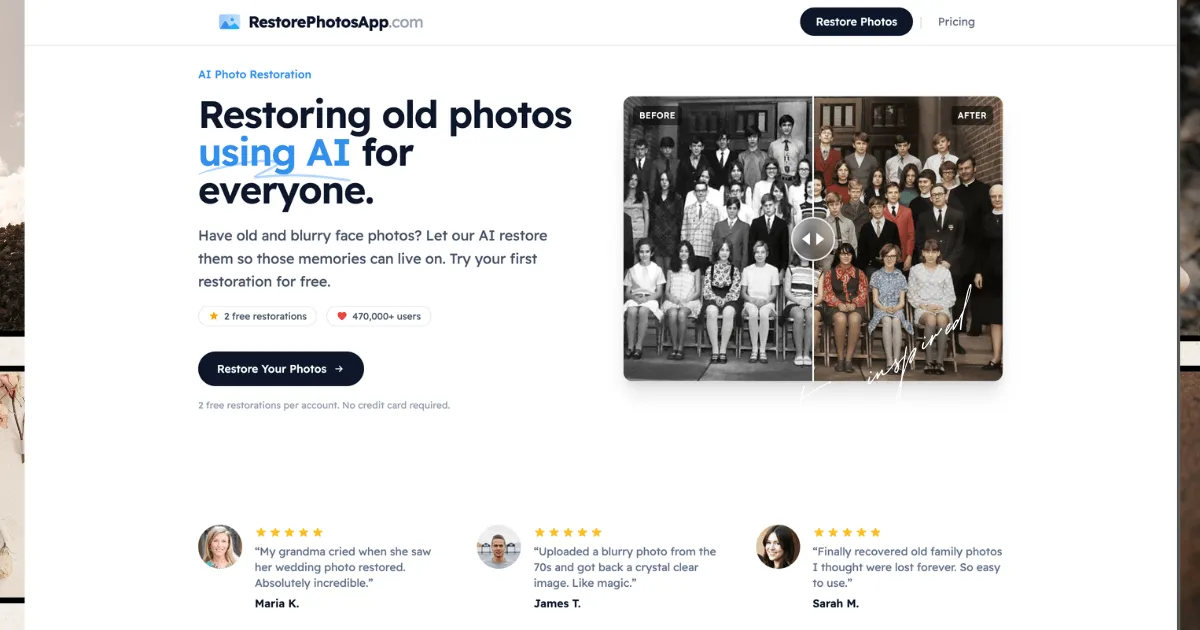
RestorePhotos is an AI-powered photo restoration service designed to bring old, damaged photographs back to life. The platform addresses a common problem faced by individuals and families: preserving cherished memories that have deteriorated over time due to fading, scratches, blur, or physical damage. Built for a broad audience ranging from casual users with family albums to professionals handling archival work, RestorePhotos positions itself as an accessible, web-based solution that requires no technical expertise or software installation. In a market where alternatives include manual photo editing software like Adobe Photoshop (which requires significant skill) or other AI tools that may be more expensive or complex, RestorePhotos stands out with its straightforward approach—offering 2 free restorations per account and one-time pricing without subscriptions. This review examines whether it delivers on its promise of making advanced AI restoration available to everyone.
Key Features
- AI Photo Restoration: The core feature uses a machine learning model trained on millions of photographs to analyze and rebuild damaged areas. It removes scratches, noise, blur, and fading while preserving the original character and expressions in photos. The process runs in the cloud and typically completes in under 30 seconds, handling various types of damage without manual intervention.
- Colorization of Black and White Photos: This feature transforms black and white or sepia images into realistic color photographs by predicting natural skin tones, fabric colors, and background hues. It works on photos from the 1800s to recent shots, making historical images more vibrant and relatable for modern viewers.
- Blur and Focus Correction: For blurry, soft, or out-of-focus photos, the Sharpen style reconstructs sharp facial features, edges, and details. This is particularly useful for old phone photos, screenshots, or motion-blurred images, enhancing clarity without distorting the original content.
- Multiple Photo Type Support: The tool works with almost any face photo, including old family portraits, vintage wedding photos, faded baby pictures, military and graduation portraits, school and yearbook photos, ID photos, scanned prints, and Polaroids. It handles black and white, sepia, and color photographs from any era, making it versatile for diverse restoration needs.
- High-Resolution Output: Restored photos can be downloaded in full resolution, with Pro and Family plans offering high-resolution 1080P output. This ensures images are suitable for reprinting at various sizes, from wallet prints to large framed portraits, and for sharing on social media or archiving in digital albums.
- Privacy and Security: Photos are processed securely over HTTPS and stored privately on Cloudflare R2. Originals and restored versions are kept for 30 days for access to restoration history, then permanently deleted. The service does not share photos with third parties or use them to train AI models, addressing common privacy concerns.
- Free Trial and One-Time Pricing: Every account gets 2 free photo restorations with no credit card required, allowing users to test the tool. Pricing is based on one-time credit packs (e.g., $4.99 for 10 photos) rather than subscriptions, and credits never expire, providing flexibility and cost predictability.
How It Works
The user journey with RestorePhotos is designed for simplicity and speed. First, users visit the website and can immediately upload an old or blurry photo without needing to create an account for the free trial. The interface guides them through selecting a style—options include Restore, Colorize, Enhance, Cleanup, or Sharpen—based on the photo's condition and desired outcome. After uploading, the AI processes the image in the cloud, typically completing the restoration in under 30 seconds. There is no waiting in a queue, and no manual editing is required. Once processed, users can preview the result, often with a before-and-after slider to compare changes, and then download the restored photo in full resolution. For paid plans, users purchase credit packs (e.g., Starter, Pro, Family) that are applied to future restorations. The entire workflow is browser-based, with no software to install, and it works on desktop, tablet, or mobile devices, making it accessible to users of all technical levels.
Use Cases
- Family Historians and Genealogists: Individuals digitizing old family albums can use RestorePhotos to repair faded or damaged portraits from the 1800s or early 1900s. For example, a user might upload a scratched wedding photo from the 1920s, apply the Restore and Colorize styles, and obtain a clear, colorized image suitable for sharing with relatives or printing as a gift, thereby preserving family heritage.
- Professional Photographers and Archivists: Professionals handling client projects, such as restoring vintage wedding photos for anniversary gifts or archiving historical documents for museums, can leverage the tool's batch capabilities with credit packs. A photographer might use the Family plan's 150 credits to restore an entire collection of military portraits, ensuring high-resolution output for exhibitions or publications.
- Casual Users with Personal Memories: Someone with blurry baby photos or damaged childhood pictures can quickly upload them, use the Sharpen style to correct focus issues, and download enhanced versions for social media posts or digital frames. This scenario often involves non-technical users who value the tool's ease of use and free trial to test results before committing.
- Educational and Non-Profit Organizations: Schools or historical societies digitizing yearbook photos or archival materials can employ RestorePhotos to improve image quality for online archives. For instance, a school might restore faded graduation photos from the 1970s, colorize them for yearbook reprints, and use the high-resolution outputs for fundraising campaigns.
- Individuals with Damaged Physical Prints: Users who have scanned old, physically damaged photos (e.g., with tears or water stains) can upload these scans and apply the Cleanup style to remove imperfections. This is common for people inheriting photo collections, where the tool helps recover images thought to be lost forever, enabling digital preservation and sharing.
Pricing & Value
RestorePhotos offers three one-time pricing tiers without subscriptions, focusing on credit-based usage. The Starter plan costs $4.99 for 10 credits (equivalent to $0.50 per credit), allowing restoration of 10 photos with high-resolution output and a 30-day money-back guarantee. The Pro plan is $14.99 for 30 credits (also $0.50 per credit), adding 1080P output. The Family plan, labeled as "Best Value," costs $19.99 for 150 credits (reducing the cost to $0.13 per credit), offering the same features but at a 74% discount per credit for bulk usage. All plans include credits that never expire and free digital frames. Compared to alternatives—such as premium photo editing software with steep learning curves or subscription-based AI services—RestorePhotos provides good value for occasional users and excellent value for those with large restoration needs, thanks to its transparent pricing and lack of recurring fees. However, for users requiring very frequent restorations, the per-credit cost might add up, though the Family plan mitigates this with its bulk discount.
Final Verdict
RestorePhotos successfully delivers on its promise of making AI photo restoration accessible to a wide audience. Its key strengths include a user-friendly, web-based interface, effective AI features for restoration and colorization, strong privacy protections, and a generous free trial. The one-time pricing model with non-expiring credits is a standout advantage in a market often dominated by subscriptions. However, the tool is primarily focused on face photos, which may limit its utility for non-portrait images, and the credit-based system could become costly for users with very high volumes of restorations beyond the Family plan. Overall, RestorePhotos is highly recommended for individuals, families, and professionals looking to preserve memories without technical hassle. It is particularly suitable for those with moderate restoration needs who value simplicity and cost predictability. Users requiring advanced editing controls or support for non-face images might need to supplement it with other tools, but for its target audience, it offers a compelling and reliable solution. Explore the pricing plans for details, check out the restoration features, or review the FAQ section for more insights.