Overview
RestorePhotos enters the competitive arena of digital photo restoration as a focused, web-based solution to a deeply human problem: the physical decay of cherished memories. In an era where countless family histories are locked in fading, scratched, or blurry photographs, the traditional paths to restoration—mastering complex software like Adobe Photoshop or outsourcing to expensive specialists—are often inaccessible. RestorePhotos targets this gap directly, offering an AI-powered tool that democratizes the process for a broad audience, from individuals rediscovering old family albums to genealogists, archivists, and even professional photographers handling client requests. Its market positioning is shrewd, distinguishing itself from subscription-based AI services and skill-intensive software with a straightforward proposition: instant, browser-based restoration with a generous free trial and a one-time, credit-based pricing model. This review will assess whether RestorePhotos delivers a professional-grade result wrapped in a consumer-friendly package, ultimately determining if it represents the most accessible bridge between deteriorating physical pasts and pristine digital futures.
Key Features
- AI-Powered Photo Restoration: This is the core engine of the service. Utilizing machine learning models trained on vast datasets of photographs, the AI automatically analyzes uploaded images to intelligently repair a wide array of damage. In practice, a user uploads a photo with scratches, dust, or fading, and the system rebuilds missing or degraded details—like facial features and textures—while preserving the original character. The value is profound: it transforms photos once considered ruined into clear, presentable images in under 30 seconds, without requiring any manual masking, cloning, or healing brush work from the user.
- Historical Photo Colorization: Moving beyond simple restoration, this feature injects life into monochrome history. The AI predicts and applies realistic color to black and white or sepia-toned photographs, analyzing elements like skin tones, clothing, and environmental cues to generate a plausible color palette. For a user with a portrait from the 1940s, this means converting a stark historical document into a vibrant, relatable image that can feel immediately more personal and engaging for younger generations, effectively bridging chronological gaps in family storytelling.
- Blur and Focus Correction (Sharpen): Addressing a common modern and historical issue, this dedicated tool style tackles blurry, soft, or out-of-focus images. It goes beyond basic sharpening filters by reconstructing facial details, edges, and textures that were lost due to camera motion, poor focus, or low-resolution scans. This is particularly valuable for salvaging otherwise precious moments captured on early digital cameras or smartphones, or for improving the clarity of scanned prints where detail has been lost.
- Multi-Style Processing for Specific Needs: The platform offers a choice of processing "styles"—Restore, Colorize, Enhance, Cleanup, and Sharpen—allowing users to tailor the AI's approach. This UI-driven choice means a user with a torn photo can select "Cleanup," while someone with a intact but faded color image might choose "Enhance." This guided specificity ensures the powerful underlying AI is applied optimally for the problem at hand, increasing the likelihood of a satisfactory outcome without technical guesswork.
- High-Resolution Output for Reprinting: A critical feature for a restoration service, RestorePhotos delivers downloadable results in full resolution, with Pro and Family plans specifically offering 1080P output. This isn't just about looking good on a screen; it means the restored file possesses sufficient pixel density and quality to be professionally reprinted at various sizes, from standard 4x6 prints to larger framed portraits. This transforms the service from a digital novelty into a practical tool for physical preservation and gifting.
- Privacy-Centric Security Model: In a domain handling sensitive personal memories, RestorePhotos implements a clear and robust privacy policy. Photos are transferred via HTTPS, stored privately on Cloudflare R2 infrastructure, and automatically deleted after 30 days. Crucially, the company states it does not share images with third parties or use them to train its AI models. This addresses a primary concern for users hesitant to upload personal family archives to cloud services, providing necessary peace of mind.
- Credit-Based, Non-Expiring Pricing: Departing from the industry norm of subscriptions, RestorePhotos operates on a one-time credit purchase system. Users buy packs of credits (e.g., 10, 30, or 150) that are consumed per restoration and never expire. This model offers transparent cost predictability and flexibility, appealing to users with sporadic or project-based needs who chafe at recurring monthly fees for a service they may use only occasionally.
How It Works
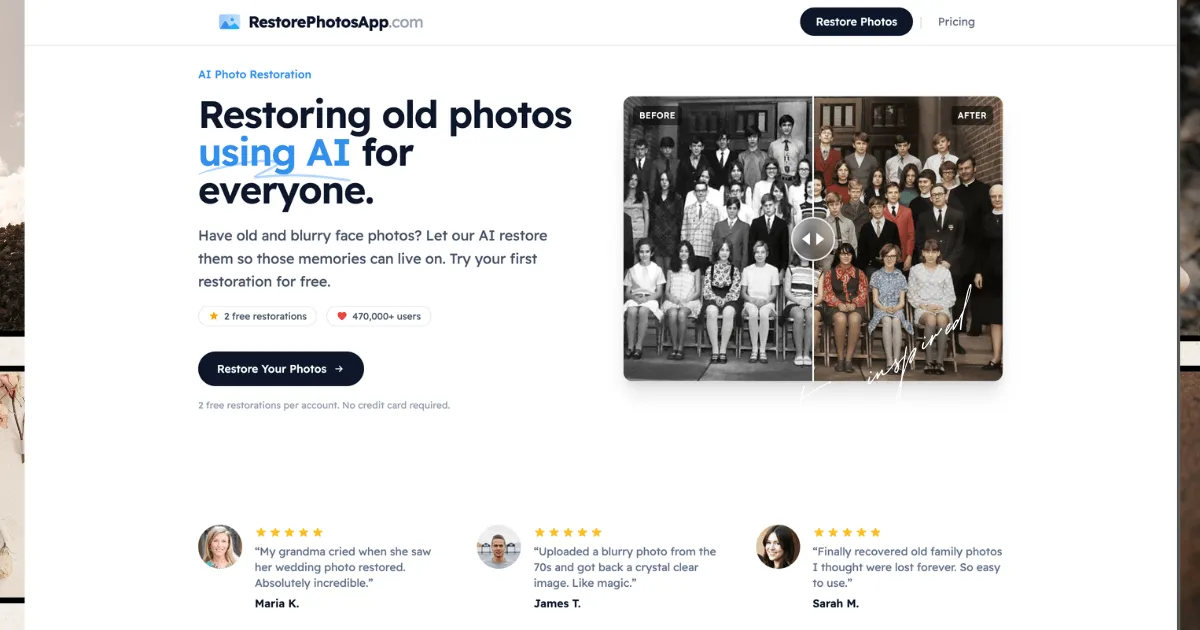
The user experience with RestorePhotos is engineered for maximum simplicity, reflecting its goal of accessibility. The journey begins on the website's main interface, where users can immediately drag-and-drop or select a photo file without any mandatory account creation—a low-friction entry point crucial for testing the service. The system then prompts a choice of restoration style (Restore, Colorize, Sharpen, etc.), guiding the user to match the tool to their photo's primary issue. Upon upload, the image is sent to cloud servers for processing. The AI analysis and regeneration typically complete in under 30 seconds, with no queueing, and the result is displayed in a clean before-and-after comparison view, often with a slider to directly contrast the original and restored versions.
If satisfied with the preview, users can download the restored image. For the free tier, this is limited to a few complimentary restorations. To continue, users must create an account and purchase a pack of credits. This purchase is a one-time transaction; the credits are stored in the user's account and automatically deducted with each subsequent restoration. The entire workflow—upload, style selection, processing, preview, and download—is contained within the browser, requiring no software installation and functioning across desktops, tablets, and mobile devices. There are no complex settings to adjust, layers to manage, or integrations to configure; the product's power is delivered through a deliberately minimal and linear user path.
Use Cases
- The Family Historian Digitizing a Century-Old Album: A genealogist has scanned a fragile album containing portraits from the early 1900s. The photos are faded, have fine scratches, and are all in sepia tone. Using RestorePhotos, they systematically upload each scan, applying the "Restore" style to repair physical damage and the "Colorize" style to bring a new dimension to their ancestors' faces. The outcome is a complete digital archive of revitalized, colorized portraits ready to be shared in a digital family tree, printed for a reunion book, or displayed in a modern digital frame, making the family's visual history more accessible and emotionally resonant.
- The Professional Photographer Offering Restoration as a Client Service: A portrait photographer is approached by a client wishing to restore and colorize their parents' damaged 1960s wedding photo as a 50th-anniversary gift. The photographer, skilled in composition but not in meticulous pixel-level restoration, uses RestorePhotos. They upload a high-resolution scan of the torn and faded print, use the "Cleanup" and "Colorize" styles, and within minutes have a stunning result. The outcome is a high-resolution digital file the photographer can then fine-tune in their editing software if needed, and ultimately print on premium paper for a deeply personal client deliverable, adding a valuable service to their business offerings.
- The Individual Salvaging Damaged Personal Memories: A user discovers a water-damaged box of prints from their childhood in the 1980s. Many photos are stuck together, with stained and torn emulsions. After carefully scanning the salvageable ones, they turn to RestorePhotos. For a picture with a large crease through a face, the "Cleanup" style seamlessly removes the damage. For a blurry action shot, "Sharpen" recovers lost detail. The outcome is the recovery of visual memories once thought permanently lost, allowing them to be safely preserved digitally and shared with siblings and their own children, reclaiming a piece of personal history.
- A Historical Society Preparing an Online Exhibition: A local historical society is digitizing its collection of town portraits and yearbook photos from the 1920s-1950s for a public online archive. The images are of varying quality. Using the bulk-credit "Family Plan," a volunteer processes hundreds of images, applying restoration to improve clarity and colorization to make the historical figures more relatable to modern audiences. The outcome is a significantly enhanced digital archive where visitors can engage with clear, vibrant historical images, improving the educational impact and appeal of the society's online presence.
Design & User Experience
Based on its website and described workflow, RestorePhotos presents a clean, modern, and intentionally minimal interface. The design ethos appears centered on reducing cognitive load: prominent upload areas, clear style selection buttons, and a straightforward before-and-after preview dominate the experience. This simplicity suggests an extremely shallow learning curve, aligning perfectly with the target audience of non-technical users. Navigation seems minimal, as the core functionality is essentially a single-page application flow. A standout positive design decision is the inclusion of the instant before-and-after slider on results, which provides immediate, tangible proof of value—a powerful tool for user satisfaction and conversion. The service also explicitly notes mobile and tablet compatibility, indicating a responsive design. A potential area for improvement, common in such streamlined tools, is the lack of manual override or adjustment controls. Users seeking to correct a specific AI misstep—like an odd color choice in colorization—have no integrated way to do so, representing a trade-off for the sake of simplicity. The design successfully prioritizes ease and speed over granular control.
Pricing & Value
RestorePhotos employs a transparent, credit-based pricing model with three main tiers:
- Starter Plan: A one-time payment of $4.99 for 10 credits, equating to $0.50 per restoration. This includes high-resolution downloads and is suited for a user with a handful of photos to restore.
- Pro Plan: A one-time payment of $14.99 for 30 credits, maintaining the $0.50 per-restoration rate but adding guaranteed 1080P output. This fits someone with a small to medium project, like restoring a single album.
- Family Plan: A one-time payment of $19.99 for 150 credits, drastically reducing the cost to approximately $0.13 per restoration—a 74% bulk discount. This is the clear value leader for anyone with extensive restoration needs, such as entire photo collections or professional/archival work.
The free trial of 2 restorations is genuinely generous, allowing users to vet the AI's quality on their specific photos without any financial commitment. The overall value is strong, particularly when compared to subscription alternatives that lock users into recurring payments or professional services that charge per photo at a much higher rate. The non-expiring credits are a significant advantage, removing pressure to "use it or lose it." The primary value consideration is for ultra-high-volume users, where even the Family plan's 150 credits might be consumed quickly, though the cost-per-image remains very competitive.
Who Is RestorePhotos Best For?
RestorePhotos is an exceptional fit for:
- Individuals and Families with Personal Archives: Non-technical users who have a box, album, or folder of old, damaged family photos and want to preserve them digitally without learning complex software. The straightforward process and emotional payoff are perfectly matched here.
- Genealogists and Family Historians: Those systematically digitizing and enhancing historical family images for records, trees, or shared histories. The colorization feature, in particular, adds immense value for making ancestors feel more contemporary and relatable.
- Professionals Needing Occasional Restoration: Photographers, archivists, or content creators who encounter restoration projects intermittently. The credit-based system allows them to pay per job, and the speed delivers quick turnarounds for client work.
RestorePhotos may be less ideal for:
- Users Needing Pixel-Perfect, Manual Control: Perfectionists or professional restorers who need to dictate every adjustment, correct specific AI errors, or work on non-portrait imagery (like landscapes or documents) will find the tool limiting. They would be better served by advanced software like Adobe Photoshop, albeit with a steep skills investment.
- Extremely High-Volume Commercial Operations: A business needing to restore thousands of images per month might find the credit management cumbersome compared to a custom API solution or enterprise-tier service, though the Family plan's pricing remains cost-effective.