Overview
LifeVault is a mobile-first family organization application designed to transform how households manage important documents and records. Unlike traditional file storage apps that simply save PDFs or images, LifeVault uses optical character recognition (OCR) to extract structured data from scanned documents—driver's licenses, insurance cards, vaccination records, prescriptions, and more—and links that information to individual family members or pets. The app positions itself as a private, on-device alternative to cloud-based document vaults and caregiver coordination platforms, emphasizing that user data never leaves the device unless explicitly shared.
Founded by Rachel, a caregiver who experienced firsthand the difficulty of piecing together medical information during a crisis, LifeVault aims to solve the problem of scattered, hard-to-find household records. The app is currently available on iOS via the App Store, with an Android version promised later in the year. Its market positioning is unique: it combines document scanning, structured record-keeping, profile-based organization (for people, pets, and the household itself), and one-tap PDF summary generation into a single, privacy-focused tool.
LifeVault competes indirectly with cloud document vaults like Everplans and Trustworthy, caregiver apps like CaringBridge, and generic note-taking or file storage solutions. However, its on-device privacy model and the breadth of record types (over 90) give it a distinct advantage for users who prioritize data control and want a unified system rather than a collection of separate apps.
Key Features
OCR Document Scanning & Data Extraction LifeVault's core feature is its ability to scan any document—driver's license, passport, insurance card, vaccine card, prescription label—and automatically extract key fields such as name, date of birth, expiration date, policy number, or dosage. The extracted data is presented for review and editing before being saved as a structured record. The original document image remains attached and accessible from both the record and a central Documents Vault. This transforms static files into searchable, usable information.
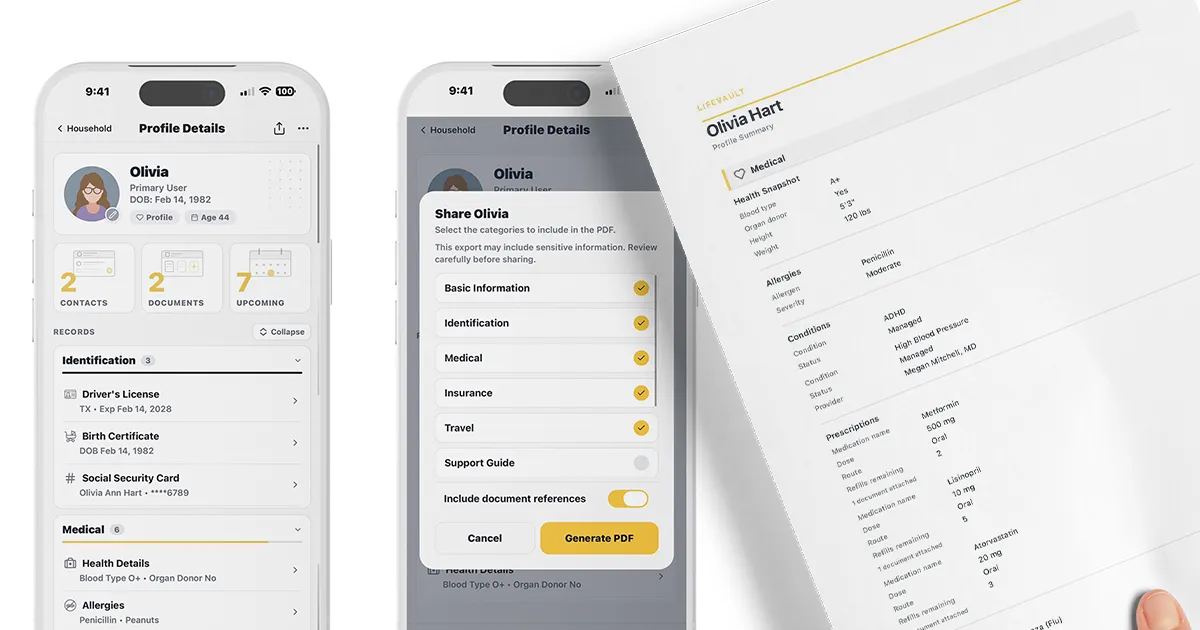
Profile-Based Organization Every family member or pet gets a dedicated profile that aggregates all linked records. Profiles are customizable: users can toggle which sections appear (e.g., Medical, Insurance, Travel, School & Support) to keep each profile focused and relevant. The app supports three levels of organization: records attached to a specific document (e.g., a prescription photo linked to that prescription), records linked to a profile (e.g., Olivia's primary care physician), and records added to the household level (e.g., the family plumber or home warranty). This three-tier architecture ensures that information is findable whether it belongs to an individual or the entire household.
One-Tap PDF Summary Generation From any profile, users can generate a clean, shareable PDF summary that includes selected sections—medical history, allergies, medications, emergency contacts, insurance details, and more. The summary can be shared via text, email, AirDrop, or any other iOS share sheet destination. This feature is particularly valuable for emergency room visits, travel with kids, handing off to a new caregiver, or pet boarding. Users control exactly which sections are included, ensuring only relevant information is shared.
Timeline & Version History Each profile includes a timeline that records significant events—medication changes, procedures, hospital stays, renewals of IDs or insurance cards. Users can choose which records appear on the timeline and can add custom events. When a document is renewed or replaced (e.g., a driver's license), the new version becomes current while the old version is automatically archived with its validity dates. This creates a living history rather than a static collection of files, and nothing is ever overwritten or deleted.
Support Guide Builder LifeVault includes a dedicated Support Guide feature designed for individuals with special needs, aging parents, or anyone who requires detailed caregiver instructions. The guide covers seven sections: Accommodations, Stress & Triggers, Calming & Support, Sensory Needs, Transitions, Safety, and Caregiver Notes. Once completed, the guide can be shared as a plain-language PDF with teachers, sitters, family members, or medical staff. The feature was designed by a parent who wished caregivers had better context from the start.
Privacy & Offline Functionality All data is stored on-device, not on LifeVault's servers. The app uses Face ID or Touch ID for biometric protection, and users can choose to lock sensitive records behind additional authentication. No ads, no data harvesting, and no social feed. The app works entirely offline—including document scanning and extraction—making it reliable in emergency situations where internet access may be unavailable. iCloud Backup and encrypted local backups are supported for data safety.
How It Works
The typical user journey begins by downloading LifeVault from the App Store and creating a household. The user then adds profiles for each family member and pet. To add a record, the user taps the scan button and captures a document—for example, a driver's license or insurance card. LifeVault's OCR engine extracts fields like name, date of birth, license number, and expiration date, presenting them in a review screen. The user can correct any errors, add notes, and then save the structured record. The original document image is automatically stored in the Documents Vault and linked to the record.
Next, the user assigns the record to the appropriate profile (e.g., Olivia) and optionally adds it to the timeline. The record is now searchable by person, record type, or keyword. Over time, as more documents are scanned—vaccination cards, prescriptions, passports—each becomes a structured record linked to the right person. Contacts like doctors, veterinarians, and schools can be added to the Directory and linked to one or multiple profiles.
When the user needs to share information—for an ER visit, a new sitter, or travel—they open the relevant profile, tap "Share," select which sections to include, and generate a PDF. The PDF can be sent via Messages, Mail, AirDrop, or any other app. The entire process, from scanning to sharing, takes minutes and requires no internet connection.
Use Cases
Emergency Room Visit A parent rushes a child to the ER. Instead of fumbling through a wallet or calling home for insurance details, they open LifeVault, generate a PDF summary of the child's allergies, medications, insurance, and emergency contacts, and share it with the triage nurse via AirDrop. The structured data ensures nothing is forgotten under pressure.
Traveling with Kids Before a family trip, a parent scans passports, vaccination records, and travel insurance cards into LifeVault. Each document is linked to the correct family member. At the airport, they generate a single PDF containing all travel documents for the family and share it with the airline or keep it accessible offline.
Caregiver for Aging Parents An adult child manages their mother's medications, doctor appointments, and insurance. They scan her prescription bottles, insurance cards, and advance directives into LifeVault, linking each to her profile. When a new specialist asks for a medication history, they generate a timeline PDF showing all changes. The mother's data stays on the child's phone, not on a cloud server.
Pet Boarding A pet owner creates a profile for their dog, Lucky, and scans vaccination records, microchip information, and vet contact details. They also complete a behavior guide in the Support Guide section. Before dropping Lucky at a boarding facility, they share a PDF with the staff covering medications, feeding schedule, and calming strategies.
Special Needs Support at School A parent of a child with autism builds a comprehensive Support Guide covering triggers, calming strategies, sensory needs, and caregiver instructions. On the first day of school, they share the guide with the teacher and aide via email. The guide helps the school team understand the child's needs from day one, reducing the likelihood of behavioral escalations.
Pricing & Value
LifeVault is currently free to download and use. The website states that higher limits—such as more documents or more family members—may eventually move to a paid plan, but existing records will remain accessible on the free tier. The company explicitly states it will never sell user data or run ads. This freemium model is common among productivity apps and offers a low-risk entry point for families to test the app's capabilities.
Compared to cloud document vaults that charge monthly subscriptions (e.g., Everplans at $12/month or Trustworthy at $15/month), LifeVault's free tier is compelling, especially given its on-device privacy. However, the lack of multi-device sync (currently only one iPhone) and the absence of a family sharing feature may limit its value for households where multiple adults need access. The roadmap includes multi-device sync, but no timeline is given. For single-device users, the free offering is excellent value; for larger families, the eventual paid plan will need to be reasonably priced to compete.
Final Verdict
LifeVault is a thoughtfully designed app that addresses a genuine pain point: the chaos of scattered family documents and the stress of finding critical information in a crisis. Its OCR extraction, profile-based organization, and one-tap PDF sharing are genuinely useful features that go beyond simple file storage. The privacy-first, on-device approach is a strong differentiator in an era of cloud-dependent services.
Areas for improvement include the lack of multi-device sync and family sharing, which limits its utility for households where both parents need access. The Android version is still pending, and the eventual pricing model remains unclear. Additionally, while the app supports over 90 record types, the OCR accuracy for less common document formats may vary.
Overall, LifeVault is recommended for caregivers, parents of young children, pet owners, and anyone who wants a private, organized system for important household records. It is particularly valuable for those who have experienced the frustration of hunting for documents during an emergency. For more details, visit the LifeVault website or check out their privacy page to understand their data policies. If you're interested in how it compares to alternatives, see their comparison section.