Overview
In an era where digital distractions are abundant and productivity tools often come with complex interfaces and recurring fees, Akita Apps positions itself as a refreshing alternative. The company provides a pair of lightweight Chrome extensions—Dopamine Destroyer and Hayaku Notes—that focus on two fundamental productivity challenges: blocking distracting websites and capturing fleeting ideas. Both tools emphasize simplicity, speed, and a total absence of subscription costs. The website’s tagline, “Software that respects your attention,” encapsulates the philosophy: no bloat, no guilt trips, just clean functionality that gets out of the user’s way. This review examines whether these tools deliver on their promise and who might benefit most from them.
Key Features
Dopamine Destroyer – Site Blocker This extension allows users to block distracting websites with a single toggle. Unlike many site blockers that require complex whitelists or scheduled sessions, Dopamine Destroyer offers an immediate on/off mechanism. The intent is to reduce friction so users can quickly reclaim focus when needed. The extension is designed to be the fastest site blocker for Chrome, emphasizing responsiveness over configuration complexity.
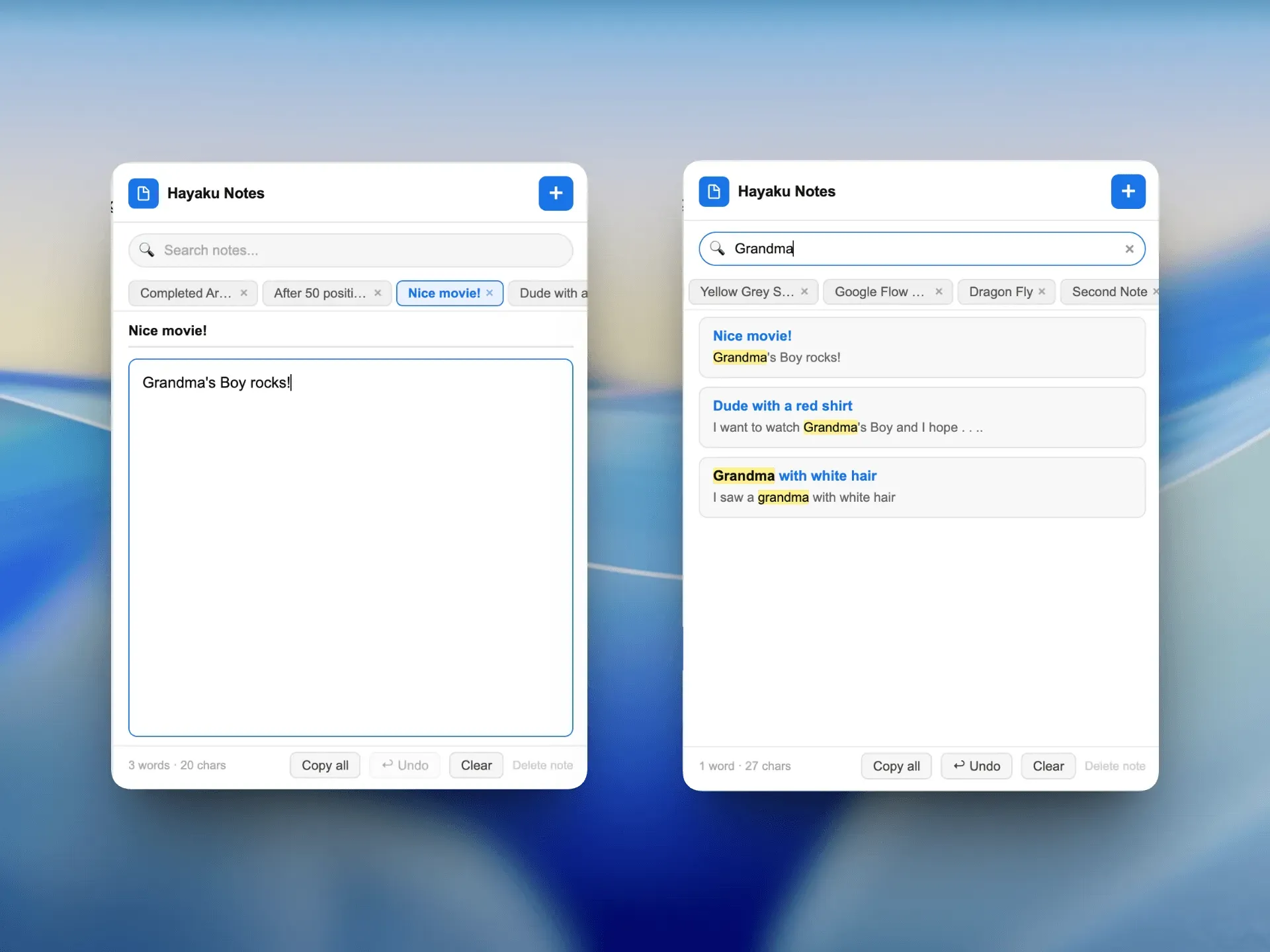
Hayaku Notes – Quick Capture Hayaku Notes is a thought-capture tool intended for rapid note taking. It is built around a one-click interaction: when an idea strikes, users click the extension icon, type or dictate a note, and move on. The tool prioritizes speed and minimal friction, making it suitable for capturing ideas before they vanish. No folders, tags, or complex organization are required—just instant capture.
No Subscription Model Both tools are offered without any recurring fees. This is a deliberate choice to align with the company’s focus-oriented philosophy. Users download and use the extensions without worrying about trials, upgrades, or hidden charges. This approach differentiates Akita Apps from many productivity extensions that rely on freemium or premium models.
Minimalist Design The user interfaces of both extensions are intentionally sparse. No unnecessary buttons, settings, or visual clutter. The design language matches the website’s clean aesthetic, with ample white space and straightforward typography. This design choice reduces cognitive load and helps users stay focused on the task at hand.
Chrome-Based Ecosystem Currently, both extensions are built exclusively for Chrome, leveraging the browser’s extension API. This ensures compatibility with a wide range of Chromium-based browsers (Edge, Brave, etc.). The focus on a single platform allows the developer to optimize performance and user experience, but also limits availability for users of other browsers like Firefox or Safari.
Fast Performance The website claims that Dopamine Destroyer is the fastest site blocker for Chrome. While this is subjective, the extension’s lightweight codebase and lack of background processes suggest it should have minimal impact on browser performance. Similarly, Hayaku Notes is designed to launch and capture notes instantly, with no syncing or loading delays.
How It Works
The user journey for both tools is intentionally straightforward. For Dopamine Destroyer, the workflow begins with installing the extension from the Chrome Web Store. Once installed, a small shield icon appears in the browser toolbar. Clicking the icon toggles the blocker on or off. When enabled, all distracting sites (by default, social media, news, and entertainment platforms) are instantly blocked. Users can customize the block list in the extension’s settings, but the default configuration works out of the box. There are no schedules, focus modes, or analytics—just a simple on/off switch.
For Hayaku Notes, the process is equally minimal. After installation, a pencil icon appears in the toolbar. Clicking it opens a small popup with a text field. Users type or paste their idea and press Enter, or click the save button. The note is stored locally in the browser’s storage. There is no cloud sync, no organization system, and no export options beyond copying text manually. The extension prioritizes speed over features, making it ideal for capturing ideas that would otherwise be lost.
Both extensions are designed to work without creating accounts or sharing data. Privacy is implicitly valued, as no user data leaves the local browser. This simplicity appeals to users who are wary of cloud-based tools or who want a no-commitment productivity solution.
Use Cases
Deep Work Sessions A developer working on a complex codebase can enable Dopamine Destroyer to block social media, news sites, and forums during focused work blocks. The tool’s instant toggle allows for quick breaks without losing focus momentum. After a session, the developer disables the blocker to access reference materials.
Brainstorming and Idea Capture A writer or entrepreneur experiencing a sudden insight can use Hayaku Notes to jot down the idea without opening a full notes app. The one-click capture ensures minimal disruption to the current flow of thought. Later, the notes can be reviewed and transferred to a more robust system.
Parental Control or Self-Regulation Parents can install Dopamine Destroyer on a child’s browser to limit access to distracting websites during homework hours. The simple toggle makes it easy for non-technical users to manage without complex parental control software.
Meeting Notes During a virtual meeting, a participant can quickly capture action items using Hayaku Notes without switching to a separate window. The lightweight popup stays out of the way and can be dismissed instantly.
Minimalist Productivity for Freelancers Freelancers who juggle multiple projects can use both tools in tandem: blocking distractions during client work and capturing project ideas on the fly. The lack of subscription fees removes a financial barrier for those with fluctuating incomes.
Pricing & Value
Akita Apps offers both extensions completely free. There are no paid tiers, in-app purchases, or subscription plans. This is a significant advantage over many productivity extensions that monetize through freemium models (e.g., limited features, then a monthly fee for full access). The free pricing makes these tools accessible to anyone with a Chrome browser.
The value proposition is strong for users who need simple, focused tools without ongoing costs. However, the lack of premium options means no cloud sync, advanced features, or customer support beyond basic documentation. For users who require more sophisticated functionality—such as cross-device syncing, analytics, or customizable blocking schedules—the free tools may feel limited. Ultimately, the pricing is a deliberate trade-off: maximum simplicity and accessibility in exchange for fewer features.
Final Verdict
Akita Apps delivers exactly what it promises: minimal productivity tools with no subscriptions and no bloat. Dopamine Destroyer and Hayaku Notes excel at their core functions—blocking distractions and capturing ideas—but they deliberately avoid the feature creep that plagues many productivity suites. The strengths lie in their speed, simplicity, and ethical pricing. The primary drawbacks are the limited ecosystem (Chrome only) and the lack of advanced features like sync, customization, or integrations. For users who value focus and want tools that get out of the way, Akita Apps is a solid choice. However, those needing a more comprehensive productivity solution may find these tools too basic. The recommendation is to try them for specific use cases—site blocking during deep work and quick idea capture—and then decide if additional features are necessary. For a free toolset that respects attention, Akita Apps is worth exploring.
For more details, visit the Dopamine Destroyer page or the Hayaku Notes page. If you have questions, the contact page provides a direct way to reach the team.