Overview
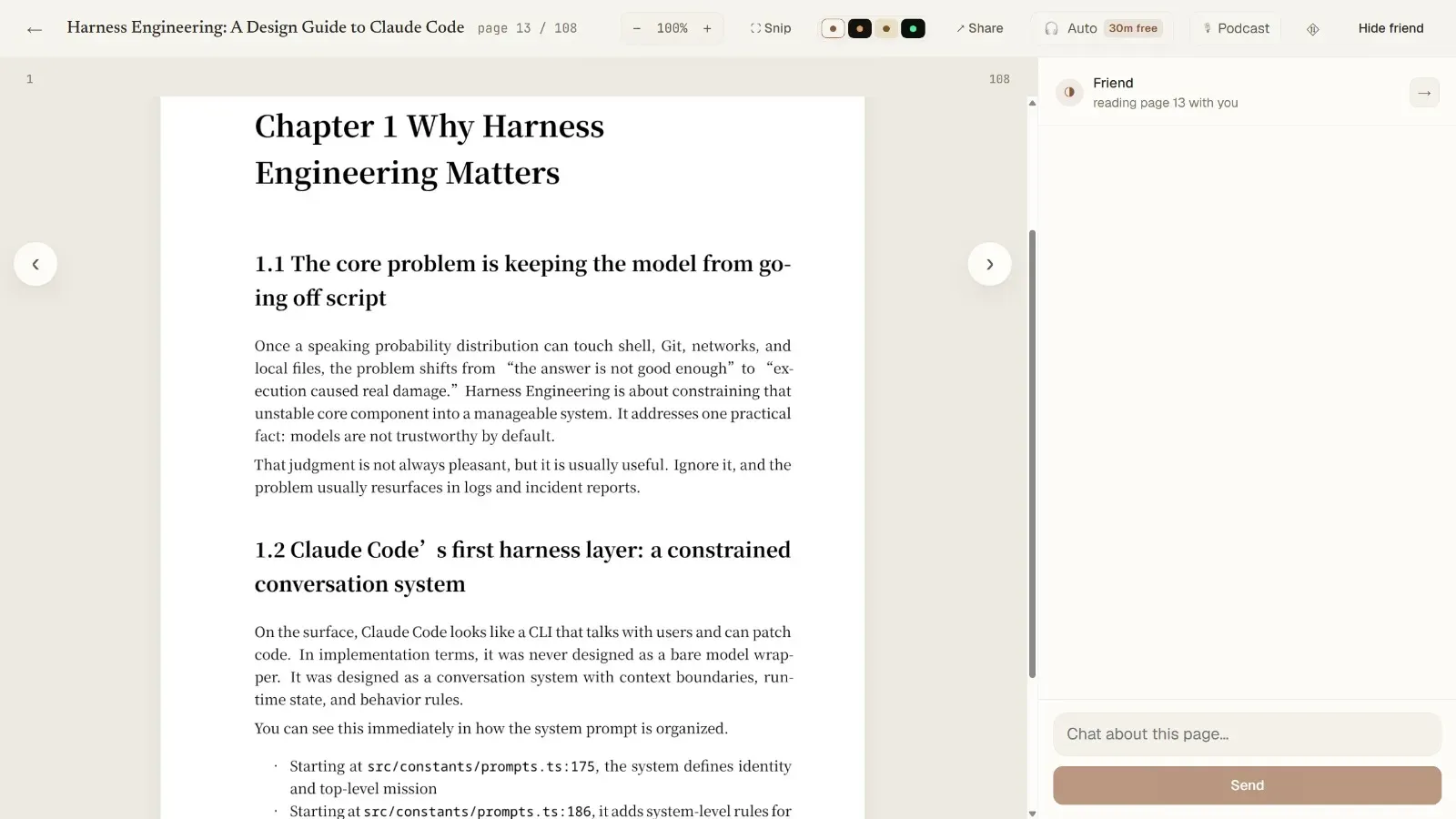
aipdfreader is an AI-powered reading companion designed to help users tackle dense, complex PDFs—such as academic papers, textbooks, and technical documents—one page at a time. The product positions itself as a warm, patient friend that walks users through each page, explaining concepts in plain language and encouraging active comprehension through a Socratic dialogue loop. Unlike traditional summarization tools that provide passive overviews, aipdfreader focuses on deep understanding by rendering each page as an image (preserving equations, figures, and layout) and using a vision model to read the page exactly as the user sees it. The tool offers two modes: Tutor mode, which quizzes users to ensure they grasp each page before moving on, and Buddy mode, which reads and discusses without testing. It also supports full-duplex voice interaction, allowing users to talk through concepts hands-free. The service is free for the first 50 pages, with a subscription model for unlimited access. The target audience includes researchers, students, professionals, and anyone who needs to truly understand dense documents—from ML papers to legal contracts. The product's core bet is that seeing the page exactly as the user does enables more accurate and contextual explanations, especially for mathematical notation and diagrams.
Key Features
Page-by-Page AI Tutoring: The core feature is a conversational AI that reads each page of a PDF alongside the user. It explains the content in simple terms, asks questions to check understanding, and provides feedback. The AI is context-aware, referencing specific equations, figures, and text on the page.
Vision-Based Page Rendering: Instead of extracting text, aipdfreader renders each page as an image and uses a vision model to interpret it. This ensures that mathematical notation, tables, figures, and multi-column layouts are preserved and understood correctly. The AI can read complex symbols like β₁ᵗ and distinguish them from similar-looking notation.
Socratic Dialogue Loop: The AI doesn't just lecture; it engages the user in a back-and-forth conversation. It asks questions like "Why can't we train v_θ on the marginal field directly?" and waits for the user to respond. This active learning approach helps solidify understanding.
Full-Duplex Voice Interaction: Users can speak their responses and questions, and the AI responds in natural speech. The interface supports interruption and real-time conversation, making it feel like a real study partner.
Two Modes: Tutor and Buddy: Tutor mode includes comprehension checks—users must explain concepts correctly to mark a page as understood. Buddy mode is more relaxed, focusing on discussion and exploration without quizzing. This flexibility caters to different learning styles and goals.
Snip and Zoom: Users can select any region of a page—an equation, a figure, or a footnote—and ask the AI to explain just that part. The zoom feature allows close inspection of dense areas without losing context.
Reading Themes and Autoplay: The interface offers light, dark, sepia, and terminal-style themes for comfortable reading. Autoplay mode lets the AI guide users through pages hands-free, ideal for passive learning or review.
How It Works
The user journey begins by uploading a PDF—no setup or API keys required. The system renders each page as a high-resolution image, preserving all visual elements. The user starts reading page 1, and the AI (called "Friend") appears in a sidebar. The Friend reads the page and provides a plain-language explanation, then asks a question to check comprehension. The user can type or speak their answer. If correct, the page is marked as understood (green progress bar); if not, the Friend offers hints or re-explains. Users can skip pages or ask follow-up questions at any time. The conversation history is maintained, allowing the AI to reference earlier points. In Buddy mode, the AI simply discusses the content without testing. The progress bar shows which pages are understood, skipped, or still unseen. After finishing a document, users can review their progress and revisit challenging pages.
Use Cases
Graduate Student Studying ML Papers: A PhD student struggling with a paper on flow matching uses aipdfreader to go through each page. The AI explains the conditional flow matching equation (7) and asks why conditioning on x₁ simplifies the problem. The student answers correctly, and the page is marked understood. The student saves hours of frustration and gains a deeper grasp of the material.
Professional Reading Technical Reports: A data scientist needs to understand a dense technical report on diffusion models. Using aipdfreader, they zoom in on equation (4) and ask the AI to explain the variance term. The AI clarifies that β₁ᵗ means β₁ raised to t, not β at step t—a nuance the scientist had missed. This prevents a costly misunderstanding in their work.
Non-Native Speaker Reading Textbooks: An international student uses Buddy mode to read a physics textbook. The AI translates and explains each page in simpler English, and the student can ask for clarification on specific terms. The voice feature allows them to practice pronunciation and listening comprehension.
Lawyer Reviewing Contracts: A lawyer uploads a complex contract and uses the snip feature to highlight ambiguous clauses. The AI explains the legal implications in plain language, helping the lawyer identify potential issues without wading through jargon.
Lifelong Learner Exploring New Topics: A curious reader wants to understand a seminal paper on generative modeling. They use autoplay mode to let the AI walk them through the entire paper, pausing to ask questions when needed. The experience is like having a personal tutor.
Pricing & Value
aipdfreader offers a generous free tier: the first 50 pages are free with no credit card required. After that, a subscription is needed for unlimited reading. The exact pricing is not disclosed on the landing page, but the value proposition is clear: users get access to a sophisticated AI reading companion without managing API keys or worrying about per-token costs. The subscription model is straightforward—no hidden fees. For students and professionals who regularly read dense documents, the time saved and improved comprehension likely justify the cost. However, the lack of transparent pricing on the site may be a minor friction point for potential users.
Final Verdict
aipdfreader is a thoughtfully designed tool that addresses a genuine pain point: understanding complex documents. Its vision-based approach ensures accurate handling of mathematical notation and figures, setting it apart from text-only alternatives. The Socratic dialogue and voice interaction create an engaging, effective learning experience. The free tier lowers the barrier to entry, and the subscription model is reasonable for heavy users. Areas for improvement include clearer pricing information and perhaps support for more document formats (e.g., ePub, web articles). Overall, aipdfreader is highly recommended for students, researchers, and professionals who need to truly understand dense PDFs. It turns solitary reading into a collaborative, rewarding journey.
For more details, check out their pricing or see how it works. You can also start reading free.