Overview
Spytrend is a competitive advertising intelligence platform built for Facebook and TikTok. It addresses a problem that every performance marketer has encountered: paid social creative is ephemeral. An ad can appear in feeds for a few days or a few weeks and then disappear, leaving competitors with only a vague recollection of the message, the landing page, or the offer. Native tools like Meta Ad Library and TikTok Creative Center provide partial visibility, but they are designed for compliance and basic discovery, not for competitive strategy. They rarely show the relationship between an ad and its connected landing page, the advertiser profile, the run duration, or the estimated level of investment.
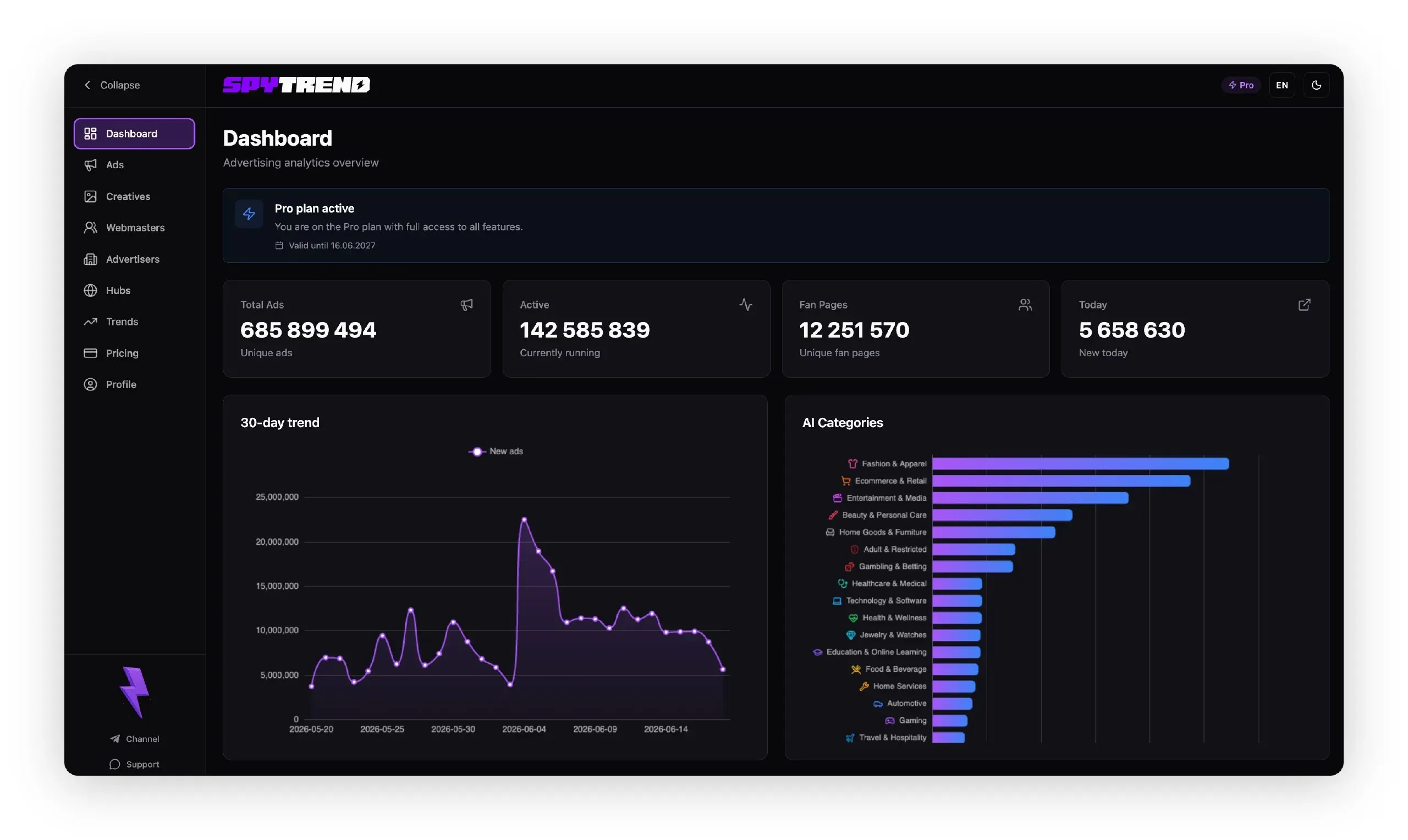
Spytrend compiles this information into a searchable database and adds important context that is difficult to obtain elsewhere. As described on Spytrend’s official website, the platform collects 10 million new ads daily, maintains a five-year archive, and covers 4.5 million advertisers. It organizes this data into 33 major business categories and 366 subcategories. That scale gives researchers a meaningful dataset rather than a thin sample.
The target audience is broad but specific: marketing teams that want to benchmark creative, brand managers who need to monitor category moves, agencies that need to build swipe files and prepare pitches, media buyers who want to understand where competitors are scaling, and competitive intelligence analysts who need to connect ad spend with business strategy.
The competitive landscape includes free native ad libraries and a variety of third-party ad spy tools. Native libraries are reliable but shallow. Many ad spy products focus on a single network or lack the structured metadata that analysts need. Spytrend differentiates itself by combining both Facebook and TikTok data, showing transparent spend ranges, linking advertiser and player profiles, and offering export and AI-assistant workflows. For teams that need structured, cross-platform creative intelligence, Spytrend is a practical and credible option.
Key Features
Spytrend’s feature set is designed around the questions that competitive researchers ask constantly: What are competitors running? How long has it been running? Where is it running? How much are they investing? The platform answers these questions with several distinct capabilities that work together as a single research workflow.
- Cross-platform Facebook and TikTok ad search: Spytrend unifies two of the largest paid social ecosystems in one interface. Instead of toggling between Meta Ad Library and the TikTok Creative Center, a user can search both platforms from one screen. This matters because creative strategies often span networks, and comparing the same brand’s Facebook and TikTok presence reveals differences in audience targeting, messaging, and offer structure.
- Full creative context with connected assets: Each ad entry includes more than just the copy or the video. The platform links to the associated creative, landing page, domains, advertiser profile, and player profile. This gives users a complete view of the conversion path. Understanding whether a competitor is driving traffic to a homepage, a product detail page, or a lead capture experience helps analysts assess whether the goal is awareness, direct sales, or audience building.
- Transparent estimated spend ranges: Instead of displaying an exact ad spend number, Spytrend presents estimated spend as a from–to range. This is a deliberate design choice that acknowledges the inherent uncertainty of predicting spend. The range still gives users a practical way to compare relative investment levels across competitors. A brand with a consistently high spend range is likely running an aggressive scaling strategy, while a low spend range suggests a smaller or experimental presence.
- Historical archive and relaunch tracking: Spytrend maintains a five-year archive and adds 10 million new ads daily. Users can see how long an ad has been running, when it stopped, and whether it has been relaunched. This turns ad intelligence from a snapshot into a trend. A competitor that relaunches an old winner is signaling confidence in a specific message or offer, and that signal is valuable for planning creative direction.
- Granular filtering by country, platform, format, and category: The platform organizes data into 33 major business categories and 366 subcategories. Users can filter results by country, platform, format, and business category. That granularity is important for teams running geo-targeted campaigns or reviewing creative performance across different regional markets. A filter like “TikTok video ads in Germany within the beauty category” narrows the dataset quickly and keeps research sessions focused.
- Export workflows and AI-assistant access: Spytrend does not lock intelligence inside the dashboard. Users can export result sets for reports, client presentations, or internal spreadsheets. The AI-assistant access allows teams to work with the data conversationally, which is useful when multiple stakeholders need answers quickly. Rather than learning a query language or manually compiling spreadsheets, a user can ask focused questions and retrieve relevant ad data.
- Large advertiser dataset: With coverage of 4.5 million advertisers and daily ingestion of new ads, the dataset is substantial for a tool at this level. This scale gives users confidence that they are seeing a representative sample of market activity, not just the largest or loudest brands. It also supports niche research, since smaller competitors and emerging brands are more likely to appear in the archive.
How It Works
Getting started with Spytrend begins with signup. The platform offers a free Starter plan, so a potential user can create an account without an immediate financial commitment. The onboarding process leads to a search-oriented workflow: users enter a competitor brand, a domain, a product name, or a business category into the ad explorer. The system then queries its database and returns a set of matching ads.
The next step is refinement. Users apply filters to narrow results by platform, country, format, or business category. For example, a beauty brand analyst might filter by the United States, TikTok, and video ads, then sort by run duration to find campaigns that have been running for months. Each result row displays key metadata such as advertiser name, country targeting, platform, format, and estimated spend range.
Clicking into an ad opens a detail view. This is where Spytrend adds the most value. The user can see the ad creative, the connected video, the landing page, and the advertiser or player profile. The detail view allows the researcher to trace the full journey from social post to destination. This is especially useful for understanding whether a competitor is using lead forms, product pages, or creator-branded content.
Day-to-day use follows a repeating loop: search, filter, inspect, export, and repeat. Users come back to the dashboard to run new searches, check for recent ads, and compare findings from different brands. The export function allows saving result sets for presentations, internal databases, or further analysis. The AI assistant can be used directly on the data to ask follow-up questions, such as which country has higher estimated spend for a specific advertiser or which creative concepts recur across a category.
Spytrend operates as a standalone web application. There are no complex integrations to install. The platform is designed to sit alongside existing media buying and attribution tools. For teams that already use ad libraries and spreadsheets, Spytrend slots into the research phase of campaign workflows.
Use Cases
Spytrend is useful in several concrete situations where competitor ad visibility directly affects strategic decisions.
A media buyer at a DTC e-commerce brand wants to avoid wasting budget on tired creative angles. They search for their two strongest competitors, filter by Facebook and the United States, and sort by estimated spend range. The results show which offers and hooks dominate the feed. The buyer then designs creative that contrasts with those saturated concepts instead of repeating them. The outcome is a more differentiated campaign plan and less budget spent on creative that looks identical to everyone else.
A creative strategist at a performance marketing agency manages 20+ client accounts. They use Spytrend to build monthly swipe files for each vertical. Instead of spending hours scrolling through native ad libraries, they export filtered ad sets by category and format. The five-year archive helps them show clients which creative styles have persisted over time and which were short-lived experiments. This leads to better conversations about long-term brand building versus short-term performance.
A competitive intelligence analyst at a mid-market SaaS company needs to understand how rivals are positioning a new feature. They search by competitor domains, use the connected landing page data to review the exact offer page, and check run duration to see whether the campaign is a prolonged push or a short launch burst. The spend range helps them compare the intensity of the new launch against previous campaigns. The analyst can then advise product marketing on whether the competitive threat is serious or just a test.
A TikTok-first brand manager monitors creator-led video trends. They inspect connected player profiles and videos to see which creators and content styles competitors are using. This gives the brand a list of potential creator partners and a clearer sense of what hooks are working in their niche. The ability to see run duration and relaunch behavior also tells them whether a competitor is committing to creator content or testing multiple directions.
A bootstrapped startup founder uses the free Starter plan to research a niche before running paid ads. They search a category, review the top advertisers’ creative and spend ranges, and identify a specific angle where estimated spend is lower. This informs whether entering paid social is realistic at their budget level or whether they should focus on organic channels first. The free tier gives them a genuine starting point without requiring a subscription.
Design & User Experience
Spytrend’s public website presents a clean, modern interface with a direct value proposition. The copy is technical and focuses on data coverage, transparency, and workflow integration. The design uses simple typography and a structured layout, giving it a confident B2B software feel. Navigation appears straightforward, with the core product features and pricing information accessible from the top-level pages.
The underlying product interface, based on the described workflow, prioritizes density over visual flourish. This is appropriate for a research tool. Users need to scan large numbers of ads and metadata fields quickly, so a table-like ad explorer with filters fits the analytics use case. The detail view is likely the strongest part of the interface because it connects creative, landing page, advertiser profile, and time data in one place.
The learning curve is moderate. Users familiar with ad libraries or competitor research tools will quickly understand the search and filter model. The AI assistant should lower the barrier for more complex queries. However, the range of filters and categories may feel overwhelming at first. The platform is clearly designed for a desktop workflow. There is no obvious evidence of a poor mobile experience, but ad research is a desktop-first activity, and Spytrend seems built for that reality.
The main rough edge is that the marketing site itself gives only a limited preview of the dashboard and its detailed workflows. Some usage patterns become clear only after signing up. That is typical for a specialized tool, but it means prospective users must be willing to create an account to evaluate the full experience.
Pricing & Value
Spytrend lists a free Starter plan and paid plans beginning at $79 per month. The Starter plan is significant because it allows users to test the data model and search experience before paying. For solo marketers and small teams, this free tier can be enough for occasional competitor checks.
The $79 entry price positions Spytrend as a mid-tier tool. It is not as expensive as enterprise social listening or media monitoring platforms, but it is not an impulse purchase for a side project. The value depends on the time it saves. An agency that spends several hours a week manually digging through ad libraries can easily justify the subscription. For a small brand that runs limited ads, the free tier might be sufficient.
The lack of detailed tier names and feature limits on the homepage is a minor friction point. Prospective customers must visit Spytrend’s website to compare exact plan differences. Still, the combination of a usable free tier and a reasonable paid entry point makes the pricing structure accessible for both solo researchers and larger teams. The upgrade path is clear: start free, evaluate the depth of data, then move to a paid plan when the workflow demands more volume.
Who Is Spytrend Best For?
Spytrend is best suited for media buying teams and creative strategists working in performance marketing. They need to know what competitors are testing, how long ads are running, what landing pages are being used, and which formats are winning. The cross-platform coverage of Facebook and TikTok makes it especially relevant for DTC e-commerce, subscription services, and creator-led brands.
Agencies are another strong fit. With export functionality, category filters, and AI-assistant access, a 10-person marketing agency can centralize competitive research for many clients. The historical archive helps teams prepare competitive narratives for pitches, quarterly reviews, and ad strategy workshops.
Competitive intelligence analysts will also find value in the spend ranges and advertiser profile connections. These features turn raw ad data into a more complete strategic picture. Instead of asking only “what is the ad saying,” an analyst can ask “how much is the brand investing, and how does that compare to previous campaigns?”
Some users should look elsewhere. Teams that advertise only on Google, LinkedIn, or YouTube will not get direct value from a Facebook and TikTok ad intelligence tool. Similarly, a very small business on a tight budget may find the free tier limiting and the $79 paid plan too expensive. In those cases, native ad libraries or lower-cost single-platform tools are worth considering.