Overview
Senja is a testimonial management platform built for creators, marketers, and business owners who need to turn scattered customer praise into a structured, reusable asset. The problem it addresses is familiar to anyone who has tried to gather social proof manually: reviews live in dozens of places, customers submit feedback through a variety of channels, and the work of formatting, organizing, and displaying those quotes is tedious. Senja centralizes that workflow in a no-code tool that imports existing reviews, collects new text and video testimonials, and publishes them across websites, email, and social channels.
The product is aimed primarily at independent creators — course sellers, newsletter writers, podcasters, authors, and YouTubers — but it also fits SaaS teams, e-commerce brands, and agencies that need scalable social proof. The market already includes tools like Testimonial.to, Trustmary, Boast.io, and Vouch. Senja differentiates through integration depth, with more than 30 import sources, automatic transcription, sentiment analysis, and a wide range of display formats. For teams evaluating options, the testimonial software comparisons page provides a transparent look at how Senja stacks up against the alternatives.
What stands out immediately is the polish of the user experience. The homepage features testimonials from well-known creators, and the interface is clean, modern, and intuitive. Senja positions itself not as a simple utility but as a growth tool that treats social proof as a core conversion lever. For any business that relies on trust to drive sales or signups, it offers a compelling, all-in-one solution.
Key Features
Senja’s feature set is built around one goal: making testimonial management as close to turnkey as possible. The following capabilities are the core reasons users choose the platform over piecing together a review form, a database, and a display widget.
- Import from 30+ Platforms — Senja can pull existing testimonials directly from Shopify, G2, Yelp, Trustpilot, Google, and dozens of other sources. Instead of copying and pasting each review, users connect a source and let the importer clean and normalize the data. A CSV upload option also supports bulk migration from less common systems, so the platform acts as a single repository for all social proof.
- Customizable Collection Forms — The built-in form builder lets users collect new testimonials with brand-matched design, custom questions, and a choice of text or video submissions. Forms can be embedded in a page or shared through a direct link, and they render on any device. A standout feature is support for incentives, such as discounts or thank-you pages, which can materially lift response rates and make the difference between a trickle and a steady stream of new testimonials.
- Smart Sentiment Analysis & Auto-Transcription — Video testimonials are automatically transcribed, turning every clip into searchable, quotable text without manual review. The same pipeline tags each submission as positive, neutral, or negative, allowing users to identify brand advocates quickly. Product teams can also mine this structured feedback for feature insights and common themes, which gives the tool value beyond pure marketing.
- Walls of Love & Display Widgets — Senja is as much about display as collection. Users can generate a Wall of Love gallery page in a grid or masonry layout, embed customizable widgets, slideshows, and pop-ups, or create shareable social media images. Each format can be inserted with a single line of code, making it easy to place testimonials on landing pages, blog posts, or email campaigns without involving a developer.
- Advanced Search & Filtering — As the testimonial library grows, finding the right quote becomes paramount. Senja’s dashboard includes granular search filters by job title, platform, keyword, product, or sentiment. Tagging and sorting by customer type or product line further enables personalized placement, so a marketing team can match specific quotes to specific pages and campaigns with confidence.
- Production-Ready Export Options — The platform avoids lock-in by offering HD video downloads and CSV exports for use in PDFs, pitch decks, or printed collateral. This flexibility is important for teams that need to repurpose testimonials beyond the website, while still keeping the platform as the management hub.
- Integrations & Developer Tools — Zapier support, a full API, and webhooks allow custom workflows and automation. Teams can connect testimonial collection to a CRM, send new submissions to Slack, or trigger actions based on sentiment. The no-code interface remains the primary path, but the developer tools ensure the product scales with organizational needs.
How It Works
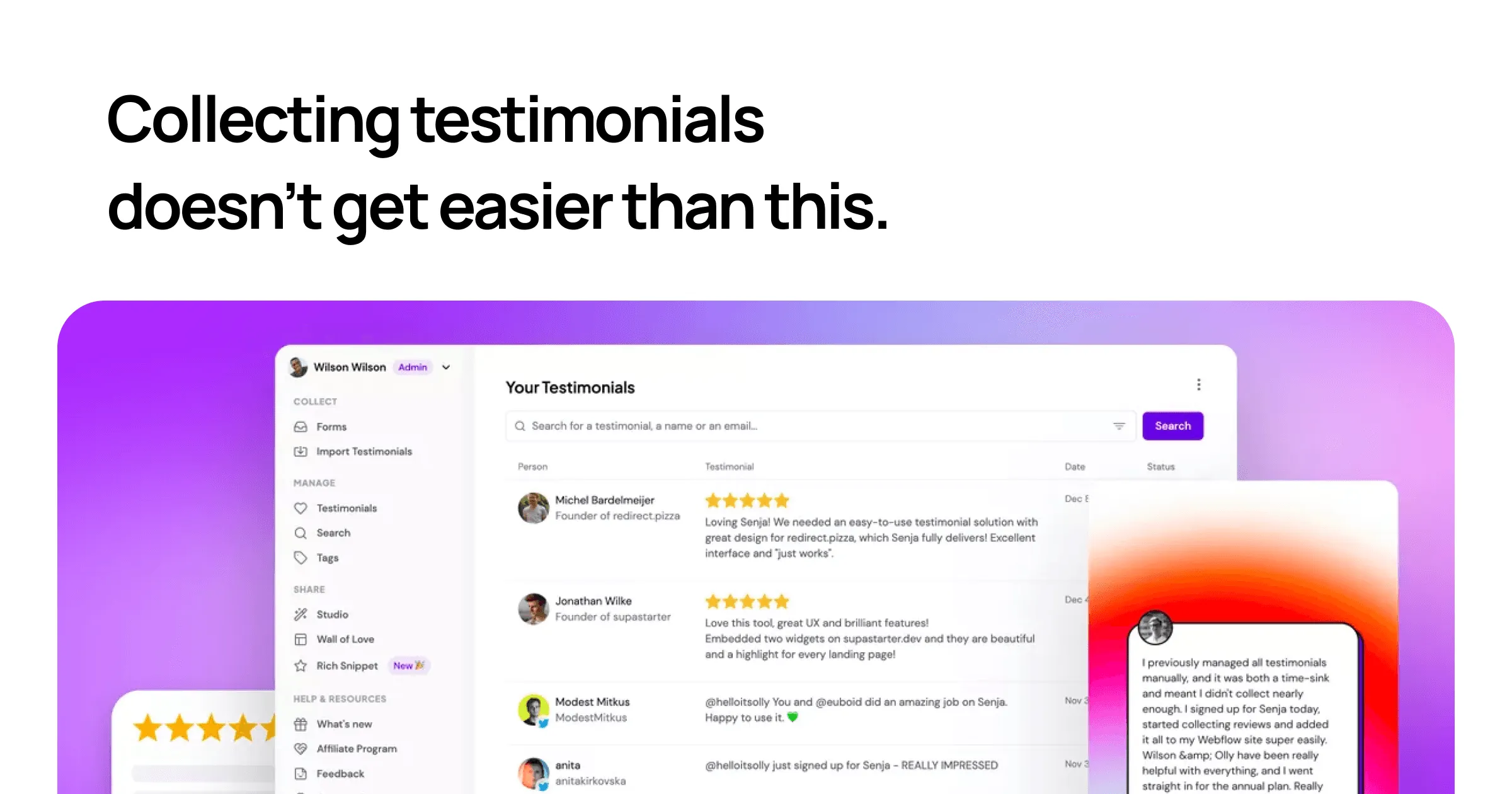
The first step with Senja is signing up, a process that takes seconds because the platform does not require a credit card for the free tier. New users land in a clean dashboard and are immediately prompted to build their testimonial library. The initial import is the fastest way to get value: users can connect an existing source such as Shopify or G2 to pull in reviews with one click, or upload a CSV file containing their current data. Senja’s importer automatically formats and deduplicates the entries, so no manual cleanup is required.
Next, users create a collection campaign. The form builder is straightforward: choose whether submissions accept text, video, or both; add custom questions; and adjust colors, fonts, and branding to match the company’s aesthetic. The form can be embedded directly on a website, linked from an email newsletter, or shared via a private URL. Senja also allows incentives, like a discount code or a custom thank-you page, which can significantly increase customer participation.
Once submissions arrive, they appear in a moderation queue where users can review, approve, and organize each testimonial. The automatic transcription for video and the sentiment tag on every submission mean there is little manual metadata work. Users can assign tags, sort by product line or customer persona, and filter by keyword or platform. The day-to-day workflow is built around this dashboard: check new submissions, approve the strong ones, and decide where each quote will have the most impact.
The sharing stage is where Senja connects to external channels. Users can create a Wall of Love page hosted by Senja, embed a widget into any website with a script tag, or generate branded social media images. For more advanced workflows, the API and Zapier integration allow automated notifications and data syncing. The whole journey — import, collect, manage, share — is designed to be self-serve and requires no coding ability, though developers will appreciate the flexibility of the webhooks.
Use Cases
A solo course creator building a sales page for a photography course. Instead of relying on a handful of screenshots buried in the FAQ, the creator imports past email praise and YouTube comments through Senja’s CSV importer. They then create a branded form that asks students to submit a short video review. Within a week, the sales page includes a Wall of Love with fresh video clips and written quotes, giving new visitors concrete proof that past students got results. The creator’s conversion rate improves because the social proof is placed at the exact moment of purchase consideration.
A B2B SaaS startup targeting enterprise buyers. The founder imports all reviews from G2 and Capterra, tags them by company size and use case, and embeds a testimonial carousel on the pricing page. Through the API, they also collect in-app feedback, automatically routing positive responses to the marketing team. Sentiment analysis lets them identify which product features are most loved, and that insight shapes both the sales deck and the roadmap. The outcome is a constantly updated proof library that aligns with each stage of the buyer journey.
A newsletter writer looking to grow subscribers. The writer wants to build trust with new visitors who arrive from social media. They add a simple Senja form to their site that asks readers, "What made you subscribe?" and incentivizes submissions with a free ebook. Approved testimonials then appear as a widget on the signup page, providing immediate validation. The writer sees a measurable increase in signup conversion because the widget addresses the new visitor’s primary objection: whether the newsletter is actually worth their inbox space.
A podcast host building sponsor credibility. The host sends a Senja video form to listeners after each episode, asking for a 30-second clip about their favorite takeaway. The auto-transcription feature pulls quotable moments into the show notes, and the best clips are compiled into a highlight reel on the podcast website. This collection of listener testimonials becomes a valuable asset when pitching potential sponsors, since it demonstrates audience trust and engagement in a tangible way.
An author launching a new book. After early readers receive advance copies, the author asks for short blurbs through a Senja link. The platform’s social media image generator turns the best quotes into polished cards for Instagram and Twitter, while a curated Wall of Love features the full quotes on the book’s landing page. The author also exports select testimonials in HD video for use in a crowdfunding campaign, accelerating pre-launch momentum.
Design & User Experience
From the moment a visitor lands on Senja’s homepage, the design language is unmissably modern. The layout uses generous whitespace, bold type, and smooth motion to create a feeling of simplicity and polish. The dashboard follows the same philosophy: navigation is minimal, with clear categories for collections, testimonials, and sharing. Buttons and icons are descriptive enough that a first-time user rarely needs to hunt for the next step. This is an interface built for non-technical users, and it shows in the absence of jargon and in the contextual help offered throughout the onboarding flow.
The learning curve is very shallow. The core loop — import, collect, manage, share — is presented as a set of sequential actions, and the product’s empty states are actually useful, guiding users to add their first testimonial or create their first display. From a responsive design perspective, Senja clearly prioritizes mobile. Forms built on the platform are explicitly optimized for phone use, which matters because many testimonials are submitted from mobile devices. The editor itself feels equally comfortable on a desktop browser.
There are, however, a few rough edges. The homepage is heavy on social proof, but it does not clearly place the pricing tiers in full view; a visitor has to dig into the pricing section to understand what the free plan includes and when an upgrade is necessary. Additionally, the sheer number of display options and customization settings may initially feel overwhelming. The onboarding does mitigate this, but users who prefer a fixed template over a blank canvas will need a few extra minutes to acclimate.
Pricing & Value
Senja operates on a freemium model that is surprisingly generous at the bottom end. The free tier collects up to 15 testimonials, which is enough for freelancers, early-stage creators, or anyone who wants to test the product before committing. It includes access to core features like import, collection forms, and display widgets, which is rare among testimonial tools that often reserve widgets for paid plans. For individuals just starting out, the free plan is genuinely usable rather than a crippled trial.
The exact pricing of paid tiers is not displayed on the homepage, which is a transparency issue. Potential buyers are asked to explore the pricing plans for specifics, and this is a friction point in an otherwise direct product narrative. However, Senja is competitively positioned relative to Testimonial.to and Trustmary, which charge similar tiered rates for comparable functionality. The inclusion of video transcription, sentiment analysis, and more than 30 import sources at the entry-level paid tier gives it a strong value proposition. Given that the platform can replace a patchwork of forms, review widgets, and manual image editors, the paid plans pay for themselves quickly for serious users.
Who Is Senja Best For?
Senja is best suited for three main groups. First, independent content creators and course sellers who need to turn student wins into a visible conversion tool. They benefit from the simple import, easy video collection, and the ability to generate beautiful quote graphics without hiring a designer. Second, small marketing teams at SaaS companies that need to manage testimonials from review platforms such as G2 and Capterra alongside user-submitted feedback. The sentiment analysis and tagging features help them choose the right proof for every landing page and campaign. Third, agencies that manage social proof for multiple client accounts appreciate the dashboard’s organizational features, like filtering and bulk export. The fact that the free tier supports a small number of testimonials makes it easy to pilot the tool on one client before deciding to standardize.
One group should look elsewhere: enterprises with extremely high-volume testimonial ingestion needs and advanced compliance requirements may find Senja too lightweight. They might prefer a dedicated customer advocacy platform with deeper CRM integrations for every major enterprise system. Similarly, teams that only need to display a single embedded quote and have no interest in collecting new testimonials can get away with a simpler, cheaper widget like Testimonial.to.