Overview
In the meticulous world of web maintenance and SEO, broken links are more than a minor nuisance; they are a direct threat to user experience, site authority, and search engine rankings. For professionals tasked with auditing websites—be it after a migration, during content refreshes, or as part of routine quality assurance—the process of manually checking hundreds or thousands of links is a soul-crushing, time-intensive endeavor. The market offers solutions, but they often involve complex setups, sending sensitive URL data to third-party servers, or providing results detached from the live page context. Enter Broken Links Checker, a Chrome extension that rethinks this fundamental task with a stark focus on privacy, immediacy, and contextual clarity. It positions itself not as another cloud-based SaaS platform, but as a discrete, powerful tool that operates entirely within the user's browser. The product targets a clear audience: SEO specialists, web developers, QA testers, and content managers who require fast, accurate, and secure link audits without the overhead of accounts, subscriptions, or data privacy concerns. Against competitors that often rely on external processing, Broken Links Checker differentiates itself through a client-side-only architecture. This review will argue that for its specific use case, this approach transforms a cumbersome administrative task into a streamlined, integrated part of the web browsing workflow, offering exceptional value through simplicity and a staunch commitment to user privacy.
Key Features
- Fully Client-Side Operation: This is the product's foundational and most defining feature. Unlike most link checkers that send every URL on a page to their own servers for processing, Broken Links Checker performs all HTTP requests directly from the user's browser. This means zero data collection, no tracking, and no risk of exposing internal or staging site URLs to external services. In practice, this translates to a "no setup, no account" installation—users simply add the extension from the Chrome Web Store and it's ready to use, with all processing power and data remaining on their local machine.
- Comprehensive Page Scan & Contextual Highlighting: The extension doesn't just check standard anchor (
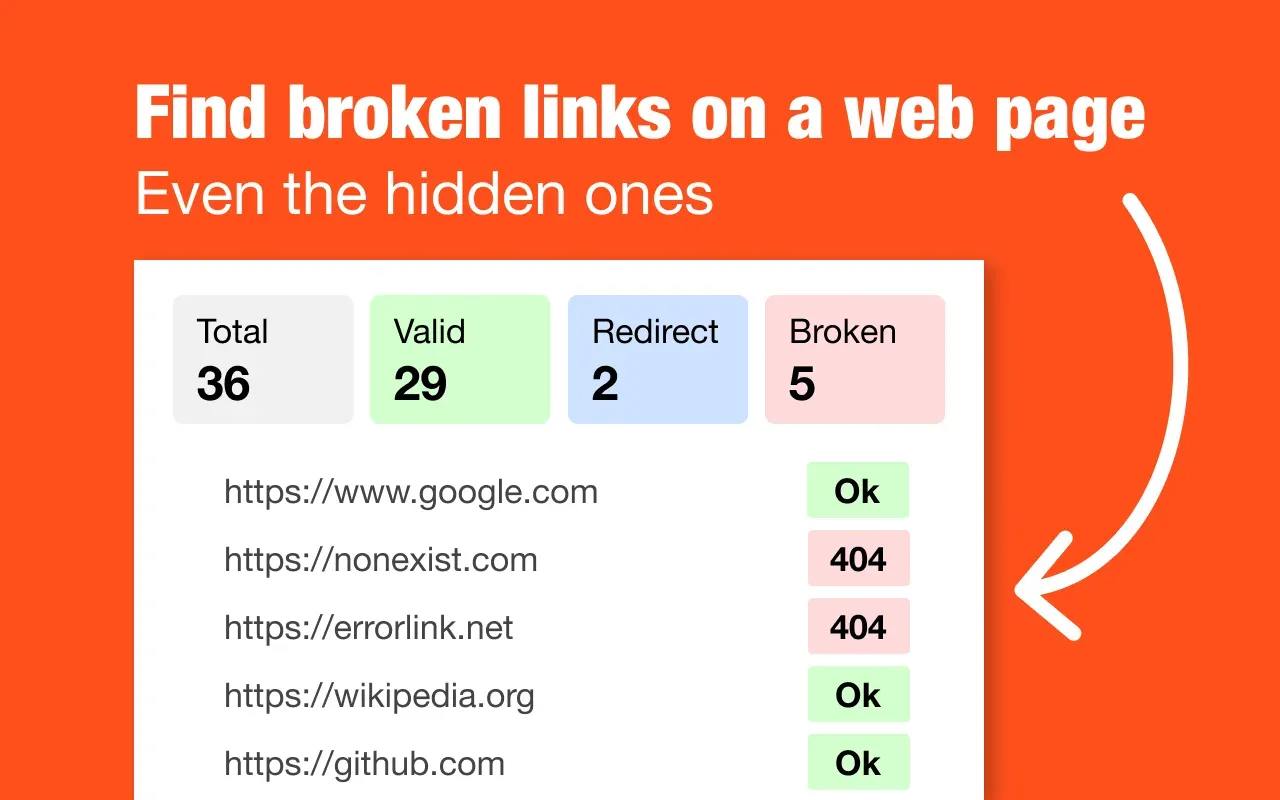
<a>) tags. It meticulously scans the entire DOM of the current page, including links within navigation menus, meta tags,onclickhandlers, and other programmatically generated elements. The results are then overlaid directly onto the page with a color-coded system: green for working (200 status) links, red for broken (404, 500, etc.), and blue for redirects (301, 302). This visual, in-context highlighting allows users to immediately identify problem areas within the actual layout and content flow, making the diagnosis and fixing process intuitive. - One-Click CSV Export for Auditing: For professionals who need to document issues for clients, teams, or ticketing systems, the tool offers a robust export function. A single click generates a detailed CSV report containing crucial data points: the link text (anchor text), the full destination URL, the exact HTTP status code (e.g., 404, 301, 200), and a plain-language status description. This feature is indispensable for SEO agencies creating client deliverables or for developers compiling a fix list after a site migration, effectively turning a visual scan into actionable, shareable data.
- Lightweight & Performance-Conscious Design: Weighing in at a mere 247KB, the extension is engineered to have a minimal footprint. It employs no background processes, ensuring it has zero impact on browser performance or system resources when not actively scanning a page. This focus on efficiency means it can be left installed permanently without contributing to browser bloat, ready for instant use whenever an audit is needed.
- Real-Time Status Dashboard: Upon completing a scan, the extension opens a compact, non-intrusive dashboard that summarizes the findings. This panel displays the total number of links checked and breaks them down by status category (OK, Broken, Redirected). It serves as a quick, at-a-glance health report for the page and provides the controls for toggling the visual highlights and executing the CSV export.
- Universal Page Compatibility: Because it operates by analyzing the rendered page in the browser, the tool works on any website the user can navigate to, including local development environments (localhost), password-protected staging sites, and complex web applications. This is a significant advantage over server-based checkers that cannot access behind-login or locally hosted content, making it a versatile tool for the entire development and content lifecycle.
How It Works
The user journey for Broken Links Checker is notably frictionless, by design. There is no traditional signup or onboarding process. A user begins by installing the extension from the Chrome Web Store—a standard, one-click procedure. Once installed, the extension's icon appears in the browser's toolbar. No configuration is required; the tool is immediately operational.
The day-to-day workflow is straightforward and integrated into natural browsing behavior. When a user lands on a webpage they wish to audit—be it their own newly launched site, a client's directory, or a legacy blog post in need of a refresh—they simply click the Broken Links Checker icon in their toolbar. The extension immediately begins its scan, sending HTTP requests from the browser to each discovered link. Within seconds, the page is overlaid with the color-coded highlights, and the summary dashboard pops up. The user can then visually inspect the page, clicking on red-highlighted links to confirm the error. If a report is needed, they click "Export to CSV" in the dashboard, and a file is downloaded to their machine. The entire process, from landing on a page to having an exported audit report, can take less than a minute for a typical page, representing a dramatic compression of a traditionally lengthy task. The tool operates in isolation, with no direct integrations with other platforms; its power lies in its singular focus and the universal utility of the CSV file it produces, which can be imported into any spreadsheet software, project management tool, or shared directly.
Use Cases
- SEO Agency Post-Migration Audits: An SEO agency completes a major platform migration for a client (e.g., from WordPress to Shopify). Before announcing the launch, a specialist uses Broken Links Checker to crawl key landing pages and the site's main navigation. The visual highlights instantly reveal broken product links and redirect chains from old URL structures. The exported CSV provides a formal, shareable report for the client and a precise fix list for the development team, ensuring the new site launches with pristine link integrity to preserve hard-earned search rankings.
- Content Team Publishing Workflow: A content manager at a digital publication is preparing to republish an updated "Best Tools of 2024" roundup. Before pushing the article live, they run the extension on the draft. Blue highlights immediately flag several tools that have changed their website URLs (301 redirects), and a red highlight catches one startup that has shut down. The editor can now update the redirects and remove the defunct link in context, ensuring the published article is current and trustworthy, directly from their CMS editing interface.
- Solo Developer Maintaining Open-Source Documentation: A developer maintaining a popular open-source library on GitHub Pages uses the extension to periodically check the project's documentation site. Since the docs are built statically and hosted for free, there is no backend to run a crawler. The client-side checker perfectly scans the local
localhost:4000preview during development and the live GitHub Pages site after deployment, catching broken links to API references or example repositories before users report them. - QA Tester Validating E-Commerce Functionality: A quality assurance tester is validating a new promotional campaign page on a large e-commerce site. Beyond testing the checkout flow, they use Broken Links Checker to ensure every "Shop Now," "Learn More," and category link on the campaign landing page correctly resolves to the intended product or collection. This catches misconfigured links that could derail a marketing campaign's performance, all without leaving the browser or writing a single line of test script.
Design & User Experience
Based on its promotional website and the described extension interface, Broken Links Checker champions a functional, minimalist design philosophy. The website itself appears clean and direct, focusing on clear value proposition messaging rather than flashy graphics. The core user interface—the browser extension popup and page overlays—is designed for utility. The color-coding system (green/red/blue) is an intuitive and immediate visual language that requires no explanation. The summary dashboard is spartan, presenting only the essential numbers and export control, which minimizes cognitive load. The learning curve is virtually non-existent; the tool's single-purpose nature means there are no complex settings to adjust or dashboards to learn. A standout positive design decision is the non-destructive highlighting that doesn't alter the underlying page layout, allowing for easy inspection. A potential rough edge, common to many browser extensions, is that the visual highlights might temporarily interfere with interacting with the page; however, they can be toggled off instantly via the dashboard. The design succeeds by staying out of the user's way and making a complex audit process feel simple and integrated.
Pricing & Value
At the time of this review, the primary Broken Links Checker extension is offered as a one-time purchase, a model that stands in stark contrast to the recurring subscription fees common in the SEO tooling space. This straightforward pricing eliminates ongoing cost calculations and provides permanent utility. The value proposition is exceptionally clear: for a single, modest fee, users gain unlimited, private scans without any page limits, team seat restrictions, or feature-gated tiers. When compared to monthly or annual subscriptions for cloud-based crawlers—which can easily cost hundreds per year for similar functionality—the return on investment is rapid, especially for freelancers, agencies, and in-house teams who perform regular audits. The "free tier" is effectively the ability to evaluate the tool's core functionality through its clear marketing and transparent explanation of its operation. The value is amplified by the tool's privacy-centric architecture; users are not just buying a link checker, they are buying peace of mind that their proprietary site data never leaves their control. The pricing model is best suited for individuals and organizations that prefer predictable costs and own their tools outright.
Who Is Broken Links Checker Best For?
Broken Links Checker is an ideal, purpose-built tool for two primary segments. First, SEO Consultants and Digital Marketing Agencies who need to produce fast, auditable link reports for clients without the security concerns of uploading client URLs to a third-party service. The CSV export function is tailor-made for their reporting workflows. Second, Web Developers and QA Professionals, particularly those working on local, staging, or authenticated sites where traditional online crawlers cannot reach. The client-side operation is a perfect fit for their technical environment.
Conversely, users who require large-scale, automated site-wide crawls of thousands of pages should look elsewhere. This tool is designed for page-by-page, manual auditing within the browser. It is not a replacement for enterprise-grade crawling software like Screaming Frog SEO Spider, which is built for mapping entire site architectures, analyzing server logs, and performing complex technical SEO audits on a scheduled basis. Those needs require a dedicated desktop application or a powerful cloud crawler.